WireNPS - Net Promoter Score
Collect NPS ratings and feedback with a clean popup interface, comprehensive analytics, and easy integration
WireNPS - Net Promoter Score for ProcessWire
A comprehensive Net Promoter Score (NPS) module for ProcessWire CMS that allows you to collect customer feedback through an elegant popup interface, track ratings, and analyze customer satisfaction with detailed analytics.
What is Net Promoter Score?
Net Promoter Score (NPS) is a widely-used customer satisfaction metric that measures customer loyalty and satisfaction on a scale of 0-10. Customers are categorized into three groups:
- Promoters (9-10) - Loyal enthusiasts who will keep buying and refer others
- Passives (7-8) - Satisfied but unenthusiastic customers who are vulnerable to competitive offerings
- Detractors (0-6) - Unhappy customers who can damage your brand through negative word-of-mouth
NPS Score Calculation:
NPS = % Promoters - % DetractorsThe score ranges from -100 (all detractors) to +100 (all promoters).
Learn more: What is Net Promoter Score? - IBM
Screenshot
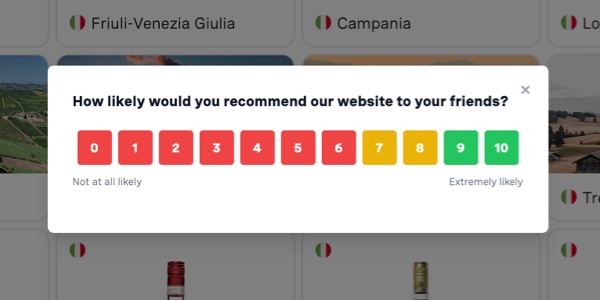
Clean, responsive NPS popup interface with color-coded score buttons (0-6 red, 7-8 yellow, 9-10 green)
Features
Core Functionality
- Popup NPS Widget - Non-intrusive popup interface for collecting ratings (0-10 scale)
- Feedback Collection - Optional text feedback alongside numeric scores
- Smart Detection - Automatic language detection based on browser/user preferences
- Guest Support - Public/private mode for both logged-in users and guests
Multilingual Support
- 4 Languages Built-in: English, German, French, Chinese
- Easy Configuration - Select second language in settings
- Auto-Detection - Automatic language switching based on user preferences
- Fully Customizable - Edit all text labels and messages per language
Analytics & Reporting
- Real-time NPS Score - Automatic calculation of Net Promoter Score
- Visual Analytics - Score distribution charts and 30-day trend graphs
- Detailed Breakdown - Promoters, Passives, and Detractors tracking
- CSV Export - Download all ratings data for external analysis
Privacy & Control
- IP Address Collection - Optional IP tracking for spam prevention
- User Agent Tracking - Optional browser/device information
- Cookie Management - Configurable expiry and multiple submissions
- Public/Private Mode - Control guest access to NPS surveys
User Experience
- Clean Design - Modern, responsive popup interface
- Smooth Animations - Fade-in effects and seamless transitions
- Keyboard Support - ESC key to close popup
- Mobile-Friendly - Works perfectly on all devices
Requirements
- ProcessWire 3.0+
- PHP 8.2 or higher
- MySQL/MariaDB database
Installation
Method 1: Manual Installation
- Download the latest release from GitHub
- Extract the ZIP file to
/site/modules/WireNPS/ - Login to ProcessWire admin
- Navigate to Modules > Refresh
- Install "WireNPS - Net Promoter Score"
Method 2: Git Clone
cd /your-site/site/modules/
git clone https://github.com/mxmsmnv/WireNPS.git
Then install via admin interface.
Quick Start
1. Create AJAX Template
File: /site/templates/wirenps-ajax.php
Copy the wirenps-ajax.php file from the module directory to your templates folder.
2. Create AJAX Page
In ProcessWire admin:
- Pages > Add New
- Title: "WireNPS AJAX Handler"
- Name:
wirenps-ajax - Template:
wirenps-ajax - Status: Hidden ✓
- Save
3. Configure Module
Modules > Configure > WireNPS
Basic Settings:
- Select second language (German/French/Chinese)
- Enable/disable guest submissions
- Configure delay and cookie expiry
- Customize text labels
Score Configuration:
- Detractor Max: 6 (scores 0-6 = Detractors)
- Passive Max: 8 (scores 7-8 = Passives)
- Promoters: 9-10
4. Enable Templates (Optional)
Leave empty to enable on all templates, or select specific templates where the popup should appear.
Configuration Options
Behavior Settings
| Option | Default | Description |
|---|---|---|
| Show Delay | 5000ms | Delay before showing popup |
| Cookie Expiry | 30 days | Days before asking same user again |
| Allow Multiple | Off | Allow users to submit multiple ratings |
| Show to Guests | Off | Enable public mode for non-logged users |
Language Settings
English (Primary):
- Question Text
- Low Score Label / High Score Label
- Feedback Placeholder
- Submit Button Text
- Thank You Message
Second Language (German/French/Chinese):
- All same fields as English
- Auto-detection based on browser/user language
- Fallback to English if language not configured
Enabled Templates
Select templates where NPS widget should appear. Leave empty to enable on all non-admin templates.
Usage
Viewing Statistics
Setup > NPS Statistics
Dashboard shows:
- Current NPS Score - Real-time calculation
- Total Ratings - All-time count
- Average Score - Out of 10
- Promoters/Passives/Detractors - Breakdown by category
- Recent Ratings - Latest submissions with pagination
- Visual Analytics - Score distribution and 30-day trend
Exporting Data
Click Download CSV to export all ratings with:
- ID, Score, Type (Promoter/Passive/Detractor)
- Feedback text
- Page ID, User ID, IP Address
- Created timestamp
Resetting User Submissions
To allow a user to submit again:
Method 1: Delete Cookie (Frontend)
document.cookie = 'wirenps_submitted=; expires=Thu, 01 Jan 1970 00:00:00 UTC; path=/;'
location.reload()
Method 2: Enable Multiple Submissions
Set "Allow Multiple Submissions" to ON in module configuration.
Multilingual Configuration
Language Detection Priority
- ProcessWire User Language - If user is logged in
- Browser Language - From Accept-Language header
- English - Default fallback
Supported Languages
| Code | Language | Native Name |
|---|---|---|
| EN | English | English |
| DE | German | Deutsch |
| FR | French | Français |
| ZH | Chinese | 中文 |
Example: Setting Up German
- Modules > Configure > WireNPS
- Second Language > Select "German (Deutsch)"
- German Language Section > Customize texts:
- Question: "Wie wahrscheinlich ist es, dass Sie unseren Service Ihren Freunden weiterempfehlen?"
- Submit: "SENDEN"
- Thank You: "Vielen Dank für Ihr Feedback!"
- Save
Users with German browser language or German ProcessWire language will see German text.
Public/Private Mode
Private Mode (Default)
Show to Guests: OFF
- Only logged-in users see the popup
- Guests (non-authenticated users) don't see NPS widget
- User ID stored for logged-in users
Public Mode
Show to Guests: ON
- Both logged-in users AND guests see the popup
- Guests receive User ID = 40 automatically
- Spam protection via IP address and session tracking
Guest User ID
When public mode is enabled, guest submissions are tracked with:
user_id = 40(special guest user ID)- IP address (if IP collection enabled)
- Session ID (PHP session identifier)
Security
Input Validation
- All user input is sanitized via ProcessWire's sanitizer
- SQL prepared statements prevent injection
- XSS protection on feedback text
Spam Prevention
- Session-based tracking
- IP address checking (optional)
- Cookie expiry control
- Database deduplication
Privacy
- IP collection is optional
- User agent tracking is optional
- Data can be deleted via database
- GDPR-compliant data handling
License
MIT License - see LICENSE file for details.
Credits
Author: Maxim Alex
Website: https://smnv.org
Support
- Issues: https://github.com/mxmsmnv/WireNPS/issues
- Email: maxim@smnv.org
More modules by Maxim Semenov
LQRS URL Shortener Profile
This site profile for ProcessWire offers a free and easy-to-use URL shortener that transforms long links into concise, shareable URLs. It is built using standard ProcessWire modules and field types.3Media Platform Profile
This site profile for ProcessWire offers a fully-featured media platform for hosting and managing video content with Backblaze B2 and Cloudflare integration.3Invite Access
Restricts site access to visitors with a valid invite code. Designed for staging environments with multiple teams.1