Stripe Payment Links Admin
View customer, purchases & products with configurable metadata columns & filters. Export reports to CSV.
Stripe Payment Links Admin (StripePlAdmin)
A ProcessWire module that provides a comprehensive admin interface for viewing and analyzing customer purchases from Stripe Payment Links in three different perspectives: Purchases, Products, and Customers.
Why This Module Was Built
Customers with multiple active Stripe accounts wanted a better, more complete overview and evaluation capabilities across all accounts, which is not possible on the Stripe web platform. This module fills that gap by centralizing purchase data, providing advanced filtering and reporting features, and offering customizable views to meet specific business needs.
Screenshots
Purchases Tab
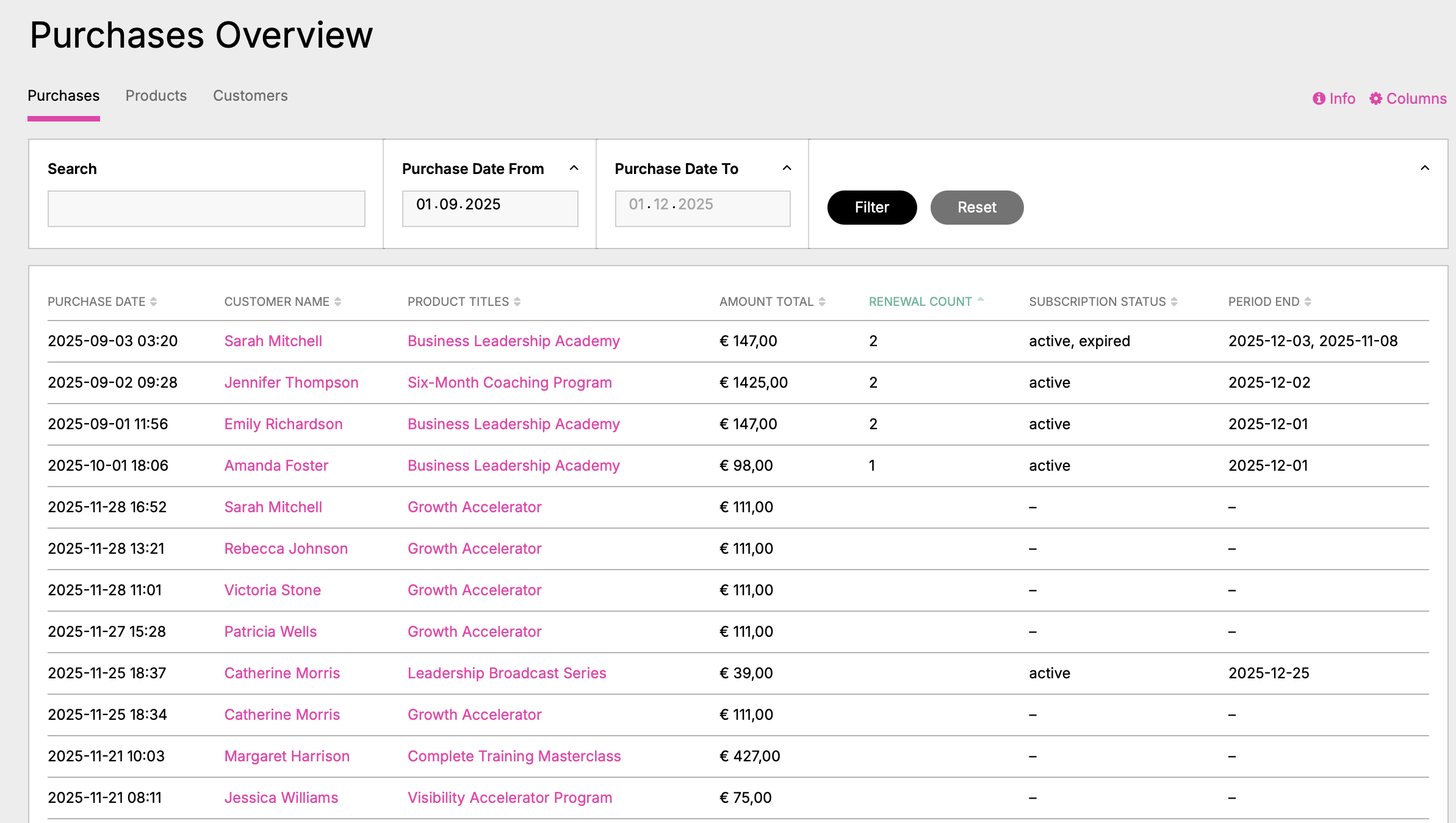
Transaction history with customer information, subscription status, and renewal tracking. Filterable by date ranges, products, amounts, and more. Customer names and product titles are clickable for detailed views.
Products Tab
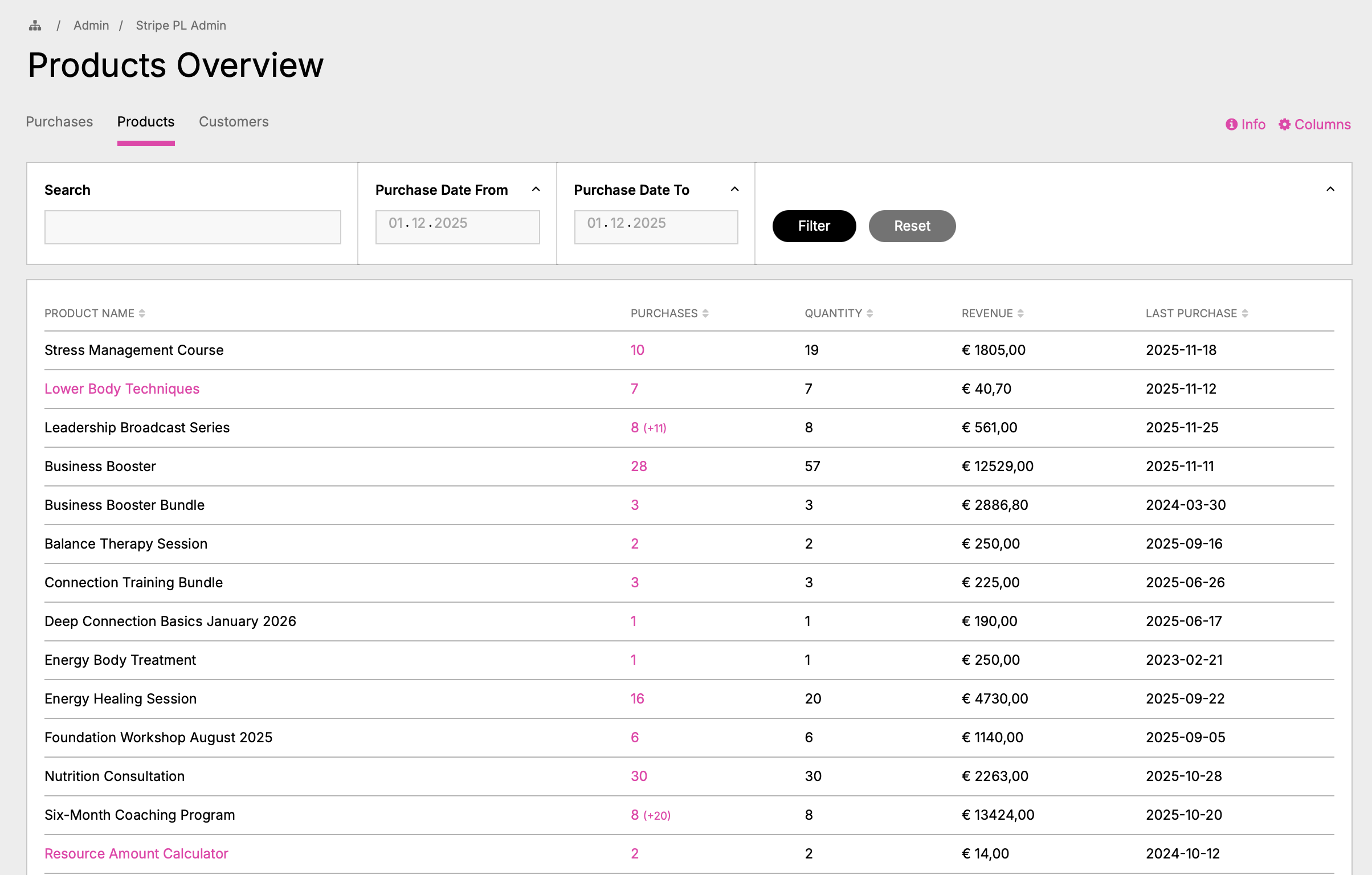
Aggregated product performance metrics showing total purchases, revenue, quantities, and renewal counts per product. Product names are clickable and display all purchases of that product in a modal.
Customers Tab
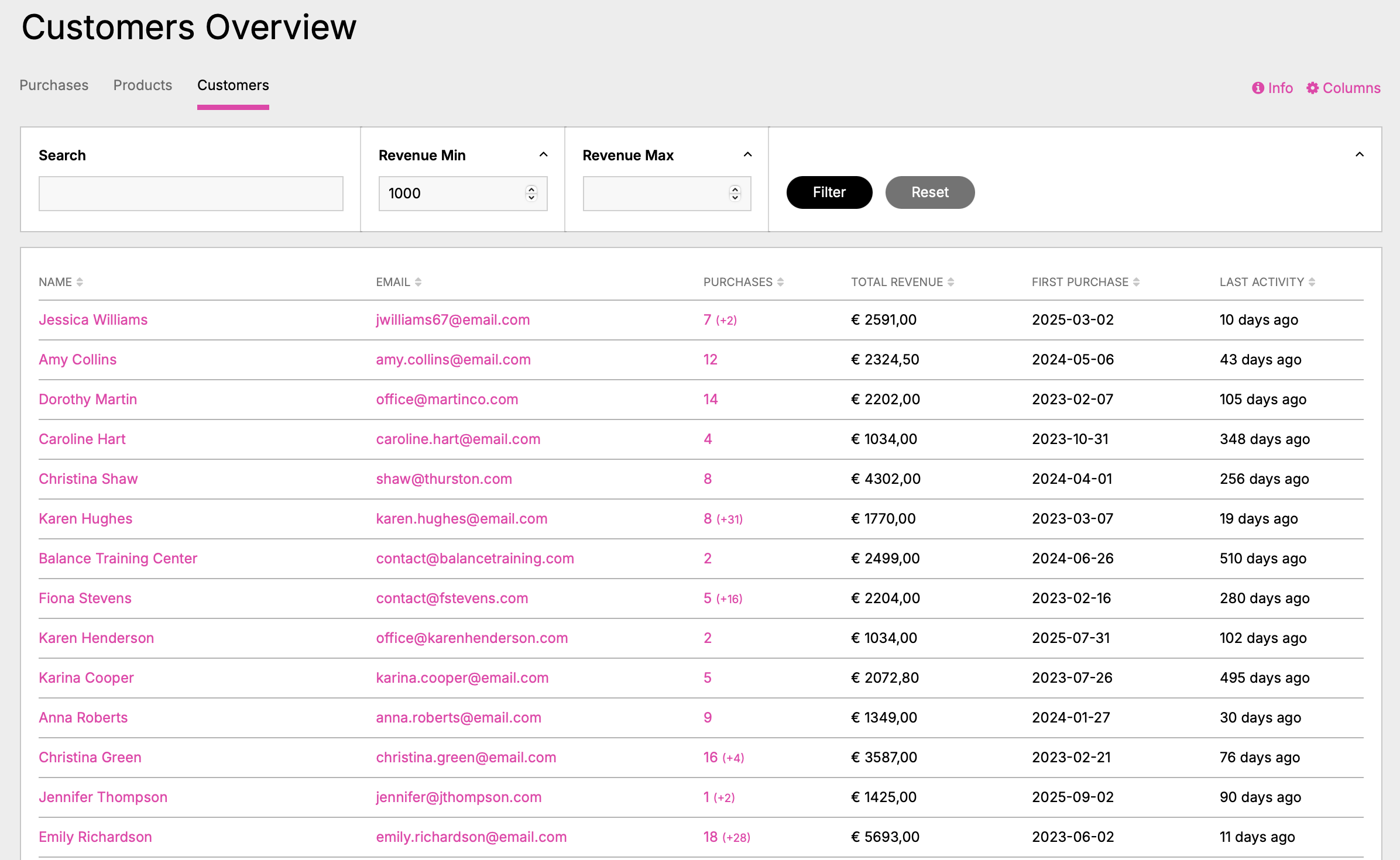
Customer lifetime value analysis with revenue filter (min. €1000). Shows total purchases, revenue, first purchase date, and last activity per customer. Click on names or purchase count to view detailed purchase history.
Purchase Details Modal
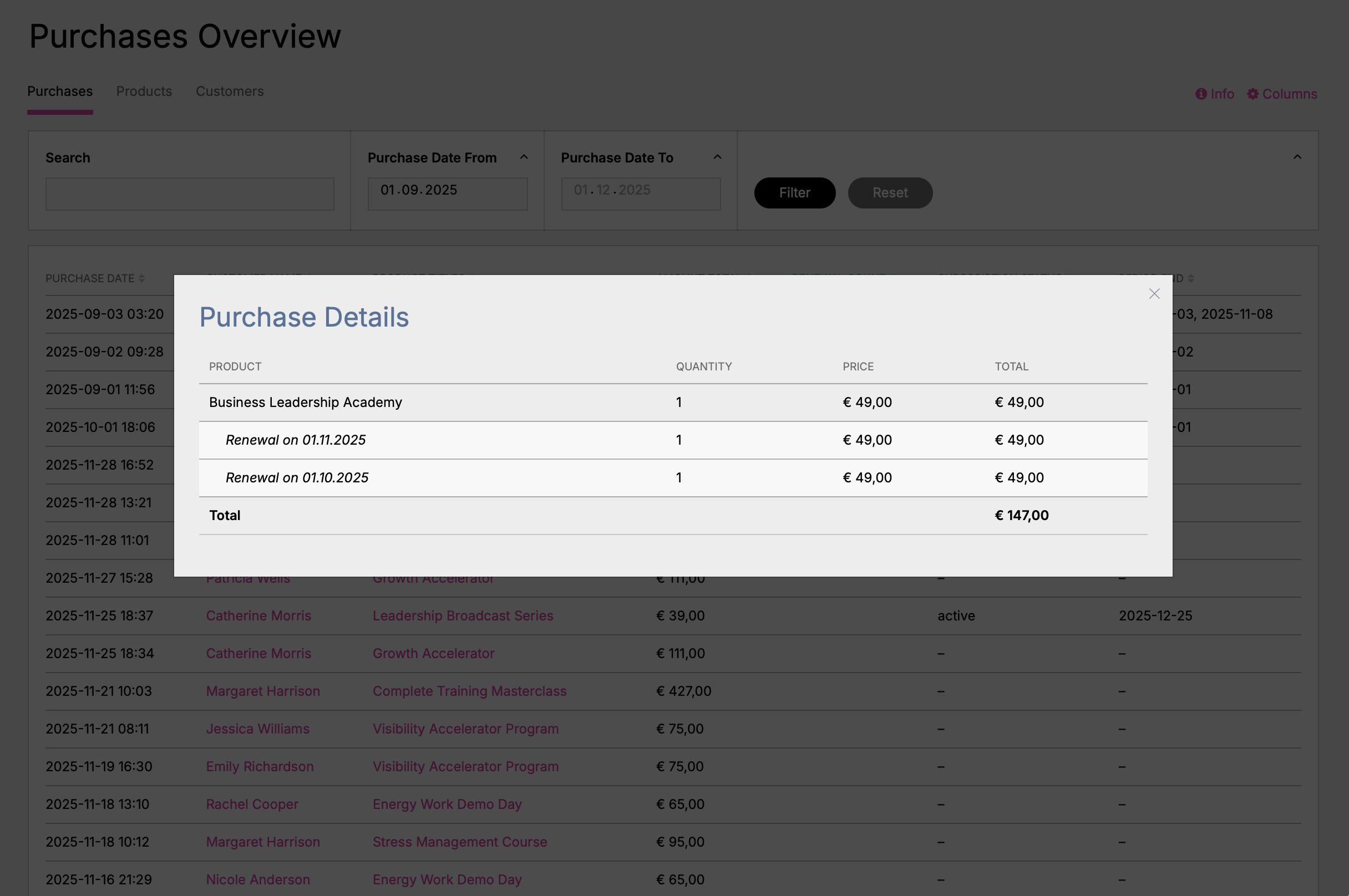
Interactive modal showing complete purchase details: original purchase plus all renewals with dates and amounts. Automatic calculation of total revenue. Opened by clicking on product titles.
Customer Purchases Modal
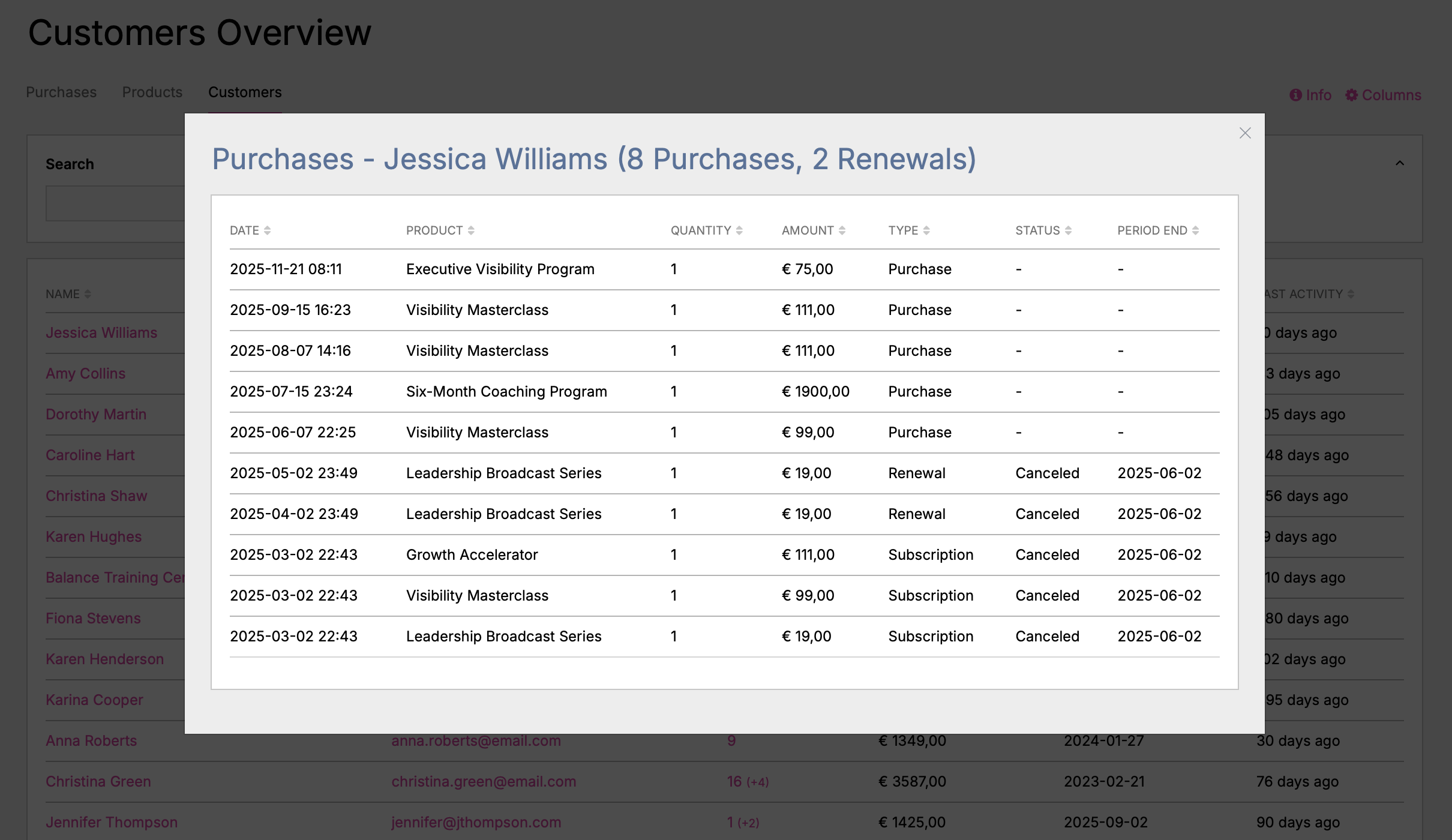
Complete purchase history for a customer showing 8 purchases and 2 renewals. Displays all products, amounts, types (Purchase/Renewal/Subscription), status, and period end dates. Sortable and filterable.
What It Does
This module displays Stripe purchase data stored by the StripePaymentLinks module in three configurable views:
- Purchases Tab: Transaction history with customer and payment details
- Products Tab: Aggregated product performance and revenue metrics
- Customers Tab: Customer lifetime value and purchase behavior analysis
Each view offers:
- Configurable columns and filters
- Boolean search (AND/OR operators, quoted phrases)
- Date range filtering (Purchase Date, Period End, Last Renewal)
- Interactive modals for detailed information
- CSV export functionality
- Statistical totals and summaries
Requirements
- ProcessWire 3.x or higher
StripePaymentLinksmodule (required dependency)- PHP 7.4 or higher
Installation
- Copy the
StripePlAdminfolder to/site/modules/ - In ProcessWire admin: Modules > Refresh
- Find "Stripe PL Admin" and click Install
- Access at
/processwire/stripe-pl-admin/
Configuration
Navigate to Admin > Setup > Modules > Configure > Stripe PL Admin:
- Purchases/Products/Customers Columns: Select which columns to display
- Purchases/Products/Customers Filters: Enable filters for each view
- Items Per Page: Set pagination (default: 25, max: 1000)
Usage Examples
Example 1: Finding High-Value Customers
- Navigate to the Customers tab
- Enable the "Total Revenue" filter
- Set minimum revenue to €1000
- Sort by "Total Revenue" (descending)
- Review the list of your most valuable customers
- Click on a customer name to see their complete purchase history
Example 2: Analyzing Product Performance
- Go to the Products tab
- Use the "Purchase Period" filter to select the last quarter
- Sort by "Revenue" to see top-performing products
- Click on a product row to see detailed purchase information with filtering
- Export the filtered data for reporting
Example 3: Finding Subscriptions Ending This Month
- In the Purchases tab, enable the "Period End" filter
- Set date range to current month (e.g., 01.12.2025 - 31.12.2025)
- The filter automatically excludes non-subscription purchases
- Sort by "Period End" to see which subscriptions end first
- Click on customer names to see their full purchase history
Example 4: Advanced Search Examples
Use the search functionality with boolean operators:
- AND Search:
john +smithorjohn AND smith- finds purchases with both terms - OR Search:
john janeorjohn OR smith- finds purchases with either term - Exact Phrase:
"John Smith"- finds exact phrase match - Combined:
"Premium Plan" +active- finds "Premium Plan" that also contains "active"
Example 5: Revenue Analysis with Renewals
- Navigate to Purchases tab
- Add "Amount Total" and "Renewal Count" columns
- Filter by date range for your analysis period
- Click on product titles to see purchase details modal showing:
- Original purchase amount
- All renewal dates and amounts
- Total revenue per purchase (original + all renewals)
- Export for financial reporting
Example 6: Finding Inactive Customers
- Go to the Customers tab
- Add "Last Activity" column
- Filter by "Last Activity" date range (e.g., more than 6 months ago)
- Sort by "Total Revenue" to prioritize re-engagement efforts
- Export the list for your marketing team
Key Features
Data Views:
- Three perspectives: Purchases, Products, Customers
- Configurable columns per view
- Sortable by any column
Filtering & Search:
- Boolean search (AND/OR, quoted phrases, + prefix)
- Date range filters (Purchase Date, Period End, Last Renewal)
- Number range filters (Amount, Revenue, Quantity)
- Product multi-select filter
- Smart exclusion (e.g., Period End filter automatically excludes non-subscriptions)
Interactive Elements:
- Click product titles → Purchase Details Modal
- Click product names → Product Purchases Modal
- Click customer names → Customer Purchases Modal
- All modals support filtering and sorting
Data Export:
- CSV export of filtered data
- Includes all visible columns
- Respects active filters
Subscription Tracking:
- Subscription status display
- Period end dates
- Renewal count and history
- Last renewal tracking
How It Works
This module is a viewing and analysis tool that reads purchase data stored by the StripePaymentLinks module:
StripePaymentLinksmodule handles Stripe API integration via webhooks- Purchase data is stored in ProcessWire user fields (
spl_purchases) - This module reads that data and provides advanced viewing/analysis capabilities
Important: This module does not make direct Stripe API calls. Data is as current as the last webhook sync from Stripe.
Version
1.1.0 (December 2025)
Author
License
MIT License
Framework: ProcessWire Stripe Integration: Stripe Payment Links
More modules by Mikel
ProcessDataTables
Displays customizable backend tables for any ProcessWire template with flexible column selection, per-field output templates, and global formatting options.25Textformatter Smart Quotes
Replaces straight quotes "..." with typographic quotes („...“, “...”, or «...»), in visible text only.17Stripe Payment Links Admin
View customer, purchases & products with configurable metadata columns & filters. Export reports to CSV.10StripePaymentLinks Customer Portal
Adds a ready-to-use /account/ page with login flow, product grid, purchase history table, and direct access to the Stripe Customer Billing Portal9Image Classes
Adds a CSS class selector for images in TinyMCE and CKEditor (admin + frontend editor).6