Panorama
Media audit and maintenance toolkit for ProcessWire images and files: inspect usage, find duplicates, clean orphaned media, audit alt text and warm image caches.
Panorama is a media audit and maintenance toolkit for ProcessWire images and files. It helps you inspect usage, find duplicates, clean orphaned media, audit alt text and warm image caches from one admin workspace.
It is made for sites where media can spread across many templates, repeaters, galleries and file fields, and where editors need one reliable place to understand media footprint, spot waste and keep generated image variations under control.
Author: Maxim Semenov
Website: smnv.org
Email: maxim@smnv.org
If this project helps your work, consider supporting future development: GitHub Sponsors or smnv.org/sponsor.
What Panorama Does
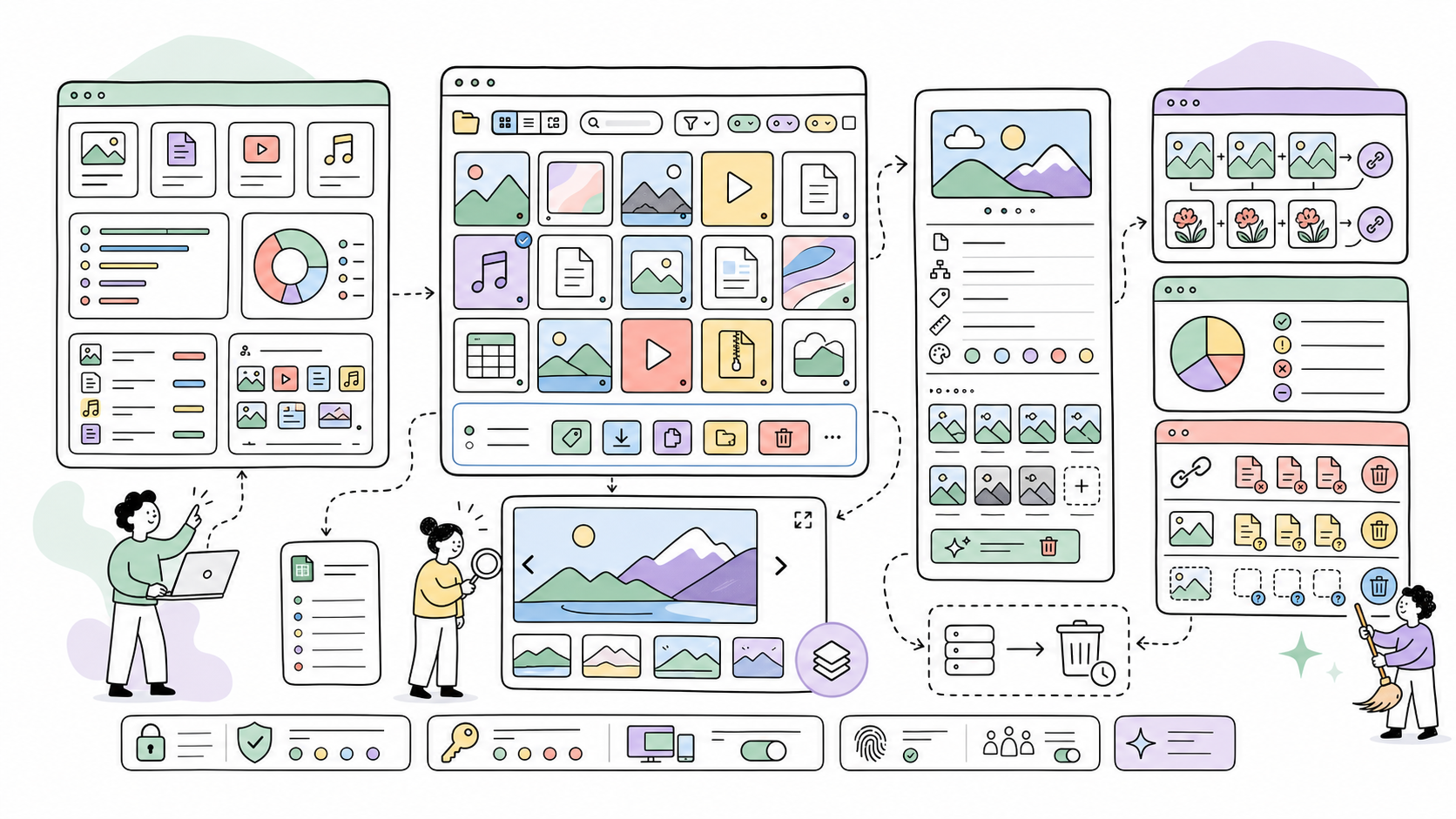
- Shows dashboard totals for images, files, media fields, average size, recent uploads and largest files.
- Breaks media usage down by file type, field, page and template.
- Loads thumbnail-heavy dashboard panels in the background so the main page stays responsive.
- Provides a visual Explorer workspace with sidebar filters, gallery mode, page grouping and template grouping.
- Uses one shared media-card grid across Dashboard, Explorer, Duplicates and Audit.
- Opens image/file details in a drawer with owner page, template, field, size, dimensions and variations.
- Cleans generated variations for selected images.
- Finds duplicate files by content hash and estimates reclaimable space.
- Audits images missing description/alt text.
- Finds broken references, orphaned originals and orphaned variations.
- Generates image variations in background warmup batches.
- Supports bulk actions such as delete, regenerate variations, tag changes, ZIP export and CSV export.
- Resolves media ownership through Repeaters, Repeater Matrix and FieldsetPage fields where possible.
Admin Area
Panorama adds a dedicated admin section under Setup > Panorama where site editors can:
- review media footprint and disk usage;
- browse images and files visually;
- filter media by any ProcessWire page selector;
- inspect where media is attached;
- open original files or edit owner pages;
- clean image variations;
- refresh duplicate scans;
- review missing alt text;
- delete cleanup candidates with CSRF-protected confirmations;
- run background image-cache warmup jobs.
CLI warmup
Large variation sets should be generated outside frontend and audit requests. Run Panorama from the ProcessWire root so work is bounded, observable, and does not depend on Apache/FastCGI request limits.
Count the work first:
php site/modules/Panorama/bin/panorama.php \
  --template=product --field=images --width=500 --height=500 \
  --processor=squareimages --mode=contain --dry-run
Warm the product-card cache in bounded steps:
php -d memory_limit=512M -d max_execution_time=0 \
  site/modules/Panorama/bin/panorama.php \
  --template=product --field=images --width=500 --height=500 \
  --processor=squareimages --mode=contain --limit=500
Use --offset=500 for the next slice, --all-images for galleries, and
--json for automation. Do not use --force during routine warmup: it deletes
matching cached variants before regenerating them.
For core ProcessWire variations, omit --processor=squareimages or pass
--processor=processwire. Add --webp to warm the matching WebP sibling
without doing that work during a frontend request:
php -d memory_limit=512M -d max_execution_time=0 \
  site/modules/Panorama/bin/panorama.php \
  --template=article --field=images --width=1200 --height=630 \
  --processor=processwire --webp --webp-quality=85 --limit=250
--quality and --webp-quality accept values from 1 to 100. WebP warmup is
available only with the core ProcessWire processor; SquareImages variants use
their own exact cache names.
Interface
Panorama follows the ProcessWire/AdminThemeUikit admin style and uses pw-design-system CSS variables where available.
The interface uses inline Remix-style SVG icons instead of Font Awesome markup, plain ES modules with no build step, and shared media cards with the same internal structure everywhere:
- preview
- filename
- technical metadata such as size, dimensions, owner page or reclaimable space
Requirements
- ProcessWire >= 3.0.227
- PHP >= 8.3
Installation
- Copy the
Panoramafolder into/site/modules/. - In ProcessWire Admin, refresh modules.
- Install
Panorama. - Open Setup > Panorama and adjust the settings.
Configuration
- Dashboard list size controls how many items appear in Largest files and Recent uploads.
- Default media type sets Explorer to images or files by default.
- Default Explorer view sets the initial Explorer mode: by page, by template or gallery.
File Commander
┌─ Panorama ───────────────────────────────────────────────────────────────┐
│ Panorama.module.php                                                     │
│ Entry point, module info and settings.                                  │
├─────────────────────────────────────────────────────────────────────────┤
│ src/PanoramaDashboard.php                                               │
│ Dashboard totals, charts, reports, largest files and recent uploads.    │
├─────────────────────────────────────────────────────────────────────────┤
│ src/PanoramaExplorer.php                                                │
│ Gallery, page and template media browsing with detail drawer data.      │
├─────────────────────────────────────────────────────────────────────────┤
│ src/PanoramaDuplicates.php                                              │
│ Duplicate scan data, grouped matches and reclaim estimates.             │
├─────────────────────────────────────────────────────────────────────────┤
│ src/PanoramaAudit.php                                                   │
│ Missing-description/alt-text reports.                                   │
├─────────────────────────────────────────────────────────────────────────┤
│ src/PanoramaCleanup.php                                                 │
│ Broken references, orphaned originals and orphaned variations.          │
├─────────────────────────────────────────────────────────────────────────┤
│ src/PanoramaWarmup.php                                                  │
│ Background image variation warmup jobs and batch state.                 │
├─────────────────────────────────────────────────────────────────────────┤
│ src/PanoramaBulkActions.php                                             │
│ Delete, regenerate, tag, ZIP export and CSV export actions.             │
├─────────────────────────────────────────────────────────────────────────┤
│ src/PanoramaMediaUtilities.php                                          │
│ Media scanning, ownership detection and variation helpers.              │
├─────────────────────────────────────────────────────────────────────────┤
│ src/PanoramaCommon.php / src/PanoramaIcons.php                          │
│ Shared rendering, labels, requests and inline SVG icon helpers.         │
├─────────────────────────────────────────────────────────────────────────┤
│ assets/css/Panorama.css                                                 │
│ Main admin UI layer.                                                    │
├─────────────────────────────────────────────────────────────────────────┤
│ assets/js/dashboard.js / assets/js/async-panel.js                       │
│ Chart rendering and background loading for heavier dashboard panels.    │
├─────────────────────────────────────────────────────────────────────────┤
│ assets/js/explorer.js / assets/js/duplicates.js / assets/js/warmup.js   │
│ Interactive workspaces, drawers, searches and background warmup.        │
├─────────────────────────────────────────────────────────────────────────┤
│ assets/js/icons.js / assets/js/legacy-icons.js                          │
│ Shared inline icons and ProcessWire Inputfield icon conversion.         │
├─────────────────────────────────────────────────────────────────────────┤
│ assets/libs/photoswipe / assets/libs/chart                              │
│ Vendored PhotoSwipe 5 lightbox and Chart.js 4 charts.                   │
└─────────────────────────────────────────────────────────────────────────┘
Orphaned-variation detection is heuristic and based on ProcessWire's generated image variation filename convention.
Author
Maxim Semenov
smnv.org
maxim@smnv.org
License
MIT
More modules by Maxim Semenov
Ichiban (SEO control center)
Comprehensive SEO module: meta/OG/schema, audit, redirects, revisions, email reports.10Ally (a11y)
Self-hosted accessibility widget powered by Sienna (MIT). Adds font, contrast, language, and navigation tools to any page. No external CDN — the JS bundle is served from your own server.7Invite Access
Restricts site access to visitors with a valid invite code. Designed for staging environments with multiple teams.6