Native Command
Keyboard command palette (Alt+K) for the admin and the front-end: edit any field, bulk-edit with selectors, undo, search and jump anywhere.
A keyboard command palette for ProcessWire — in the admin and on the front-end.
Press Alt+K (Option+K on Mac — or any shortcut you like) on any page of your site and act on it right there: edit any field, publish, rename, duplicate, move or trash it — and undo any of it. Bulk-edit hundreds of pages with a selector, see who points to a page before you delete it, and jump to any page, template, field, module or user in two keystrokes.
Think Spotlight / Raycast or the VS Code command palette — for your ProcessWire site. Works with any site profile, any templates and any fields. No dependencies.
Why you'd want it
| You want to… | Usually | With Native Command |
|---|---|---|
| Fix a typo you just spotted on the live site | admin → find the page → edit → save → back | Alt+K · title · type · Enter |
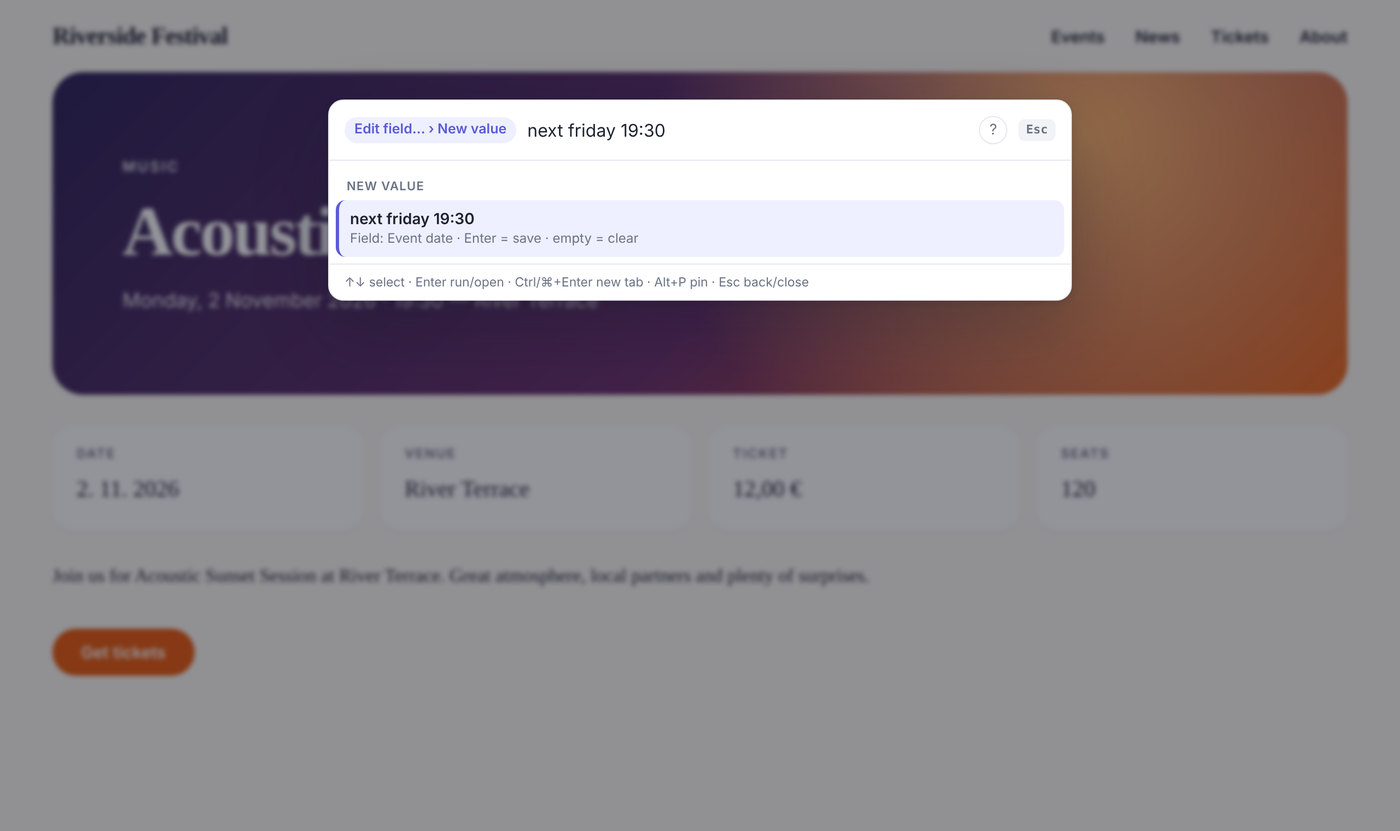
| Move an event to next Friday | admin → page → date field → datepicker → save | Alt+K · edit · date · next friday 19:30 |
| Unpublish all events that already happened | open each one, uncheck, save — ×20 | bulk unpublish · template=event, date<today · Enter |
| Know whether a page is used before deleting it | — | Alt+K · info |
| Undo a mistake | — | click Undo |
| Get to a page / template / field / module / user | menus, search screen | Alt+K · type · Enter |
It doesn't replace the page editor — it's for the hundreds of small things that don't deserve five screens.
Features
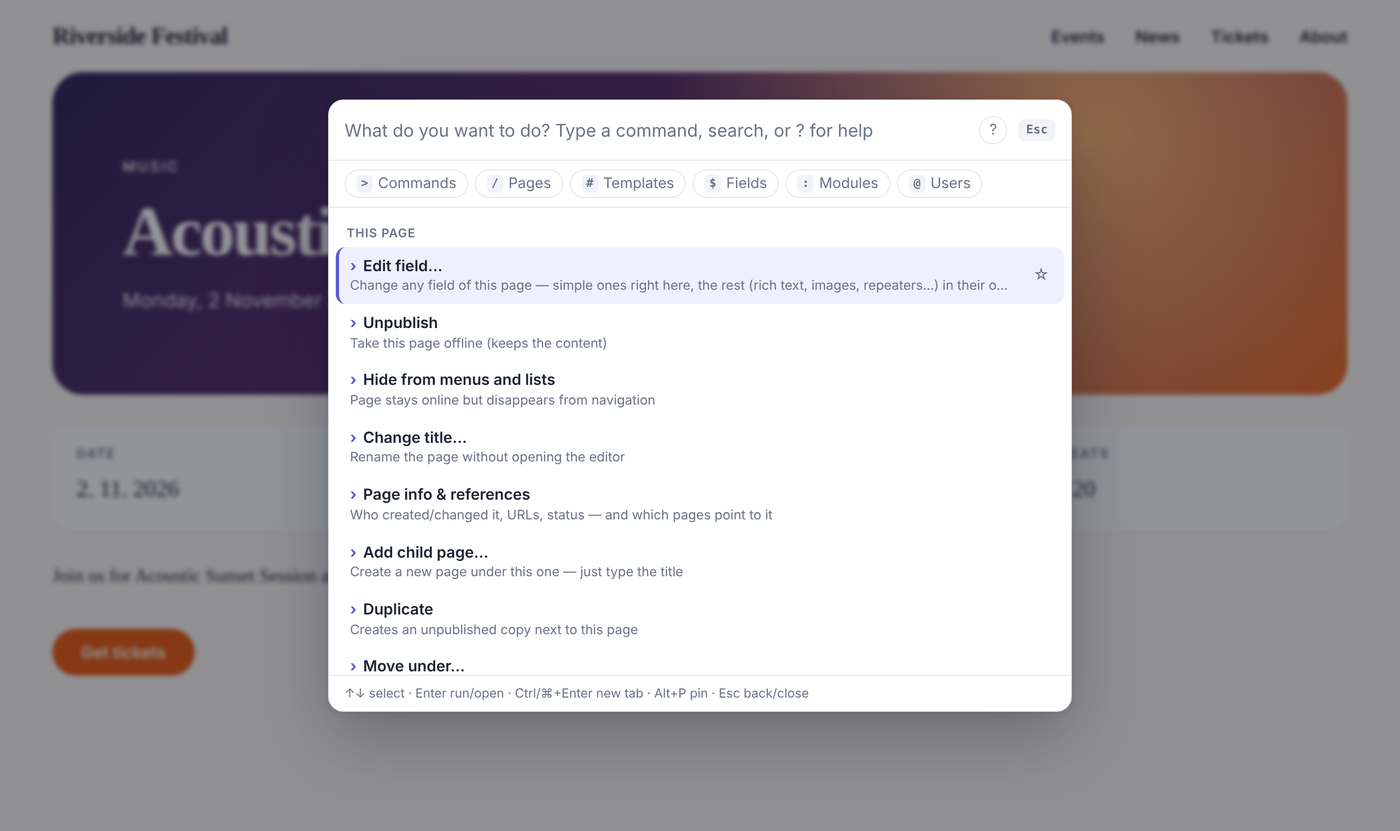
Act on the page you're looking at
On the front-end (for logged-in editors) or on the page open in the admin editor:
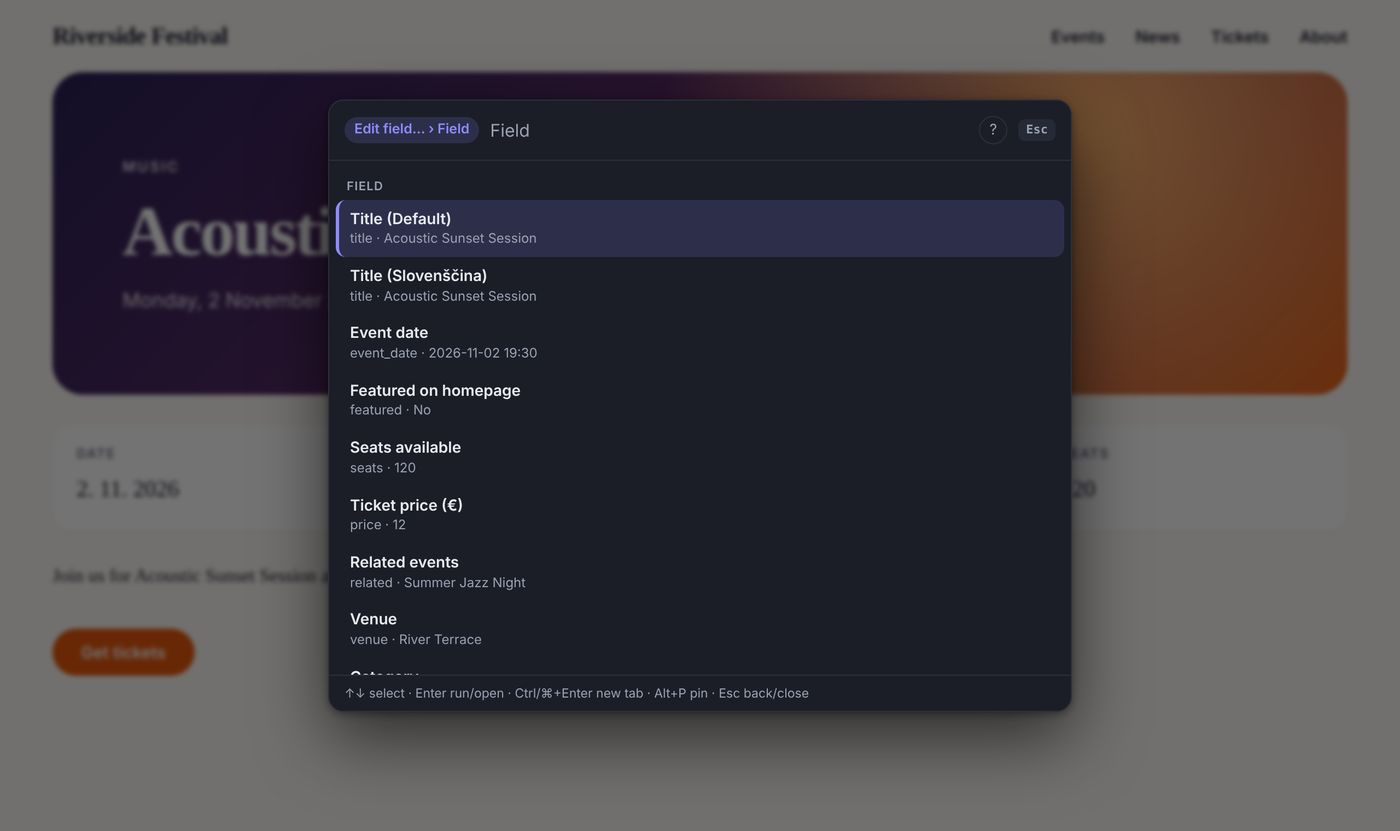
- Edit field… — any field.
- Simple fields are edited right in the palette: text, number, price (
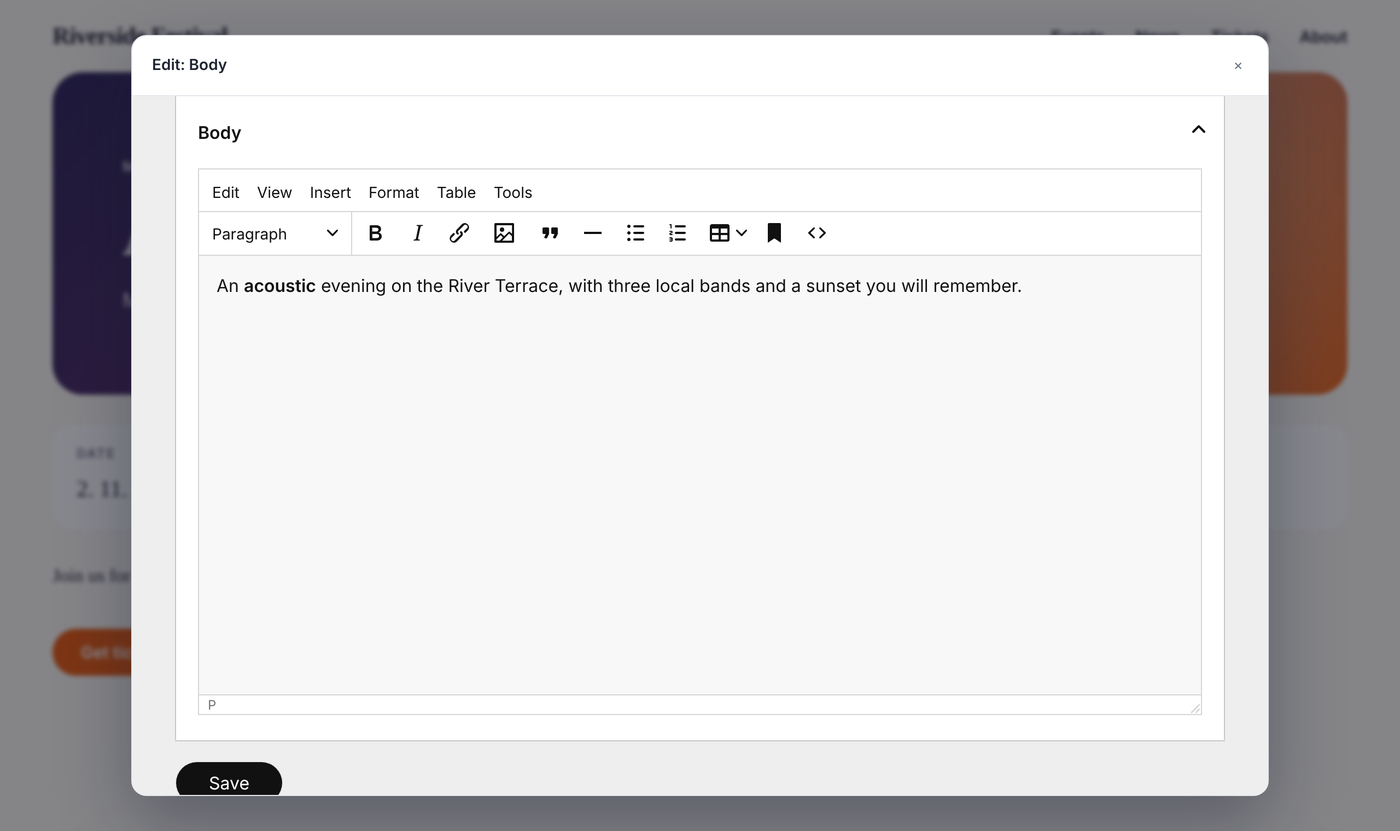
12,50works), date (5.11.2026 18:00,next friday 19:30), checkbox, toggle, Options and Page reference (every setup: parent, template, selector incl.page.context, custom code or “any page”). The current value is pre-filled, only valid choices are offered, multi-language fields can be set per language. - Everything else — rich text, images, files, repeaters, Repeater Matrix, Combo, Table, map, third-party fields, and multi-line text — opens ProcessWire's own editor in a modal, showing just that field. Full toolbar, uploads and validation; the page refreshes after saving.
- Simple fields are edited right in the palette: text, number, price (
- Publish / Unpublish (publishing is refused while required fields are empty, like in the page editor), Hide / Show in menus
- Change title…, Add child page…, Duplicate, Move under…, Move to trash
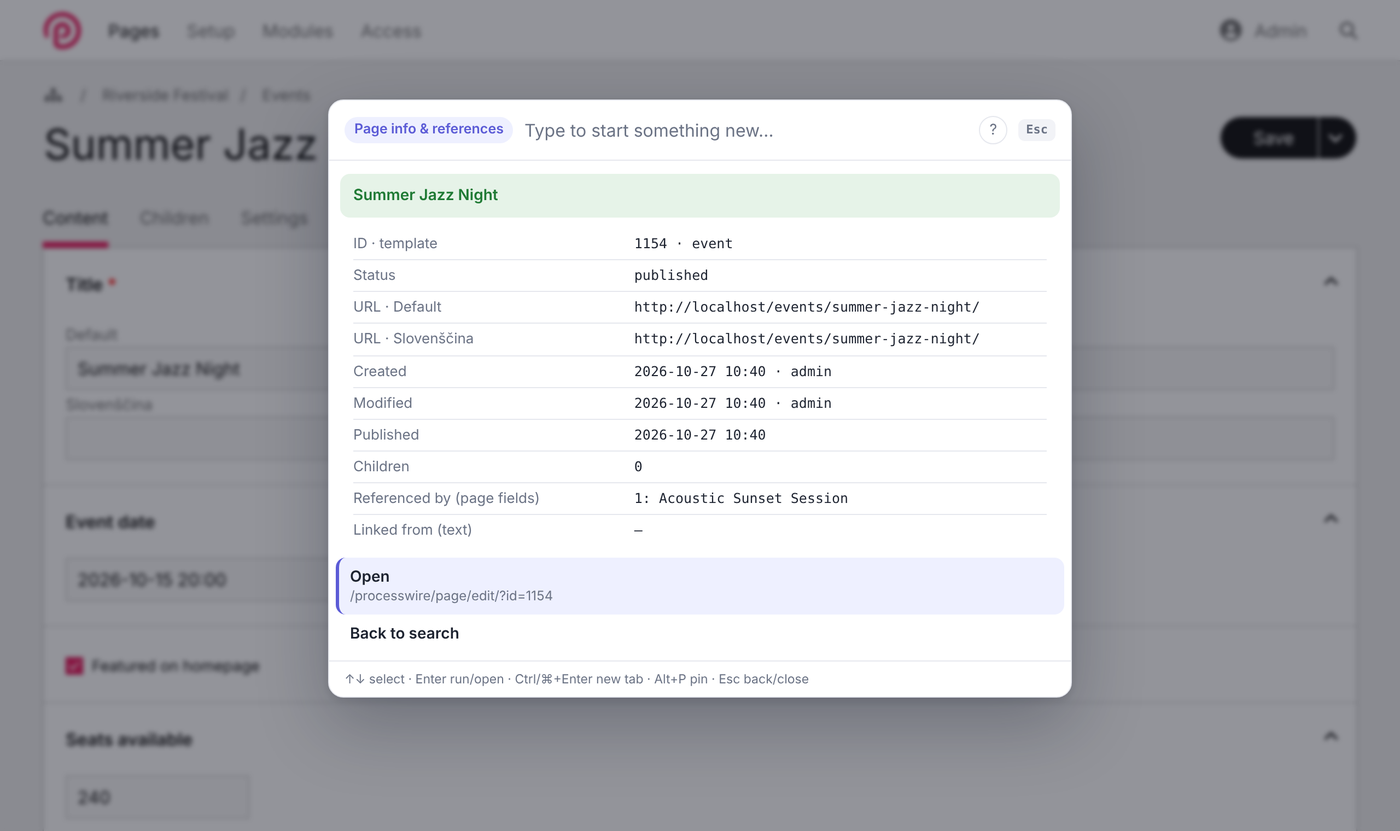
- Page info & references — ID, template, status, URLs in every language, created/modified by whom, and which pages reference or link to it. Move and Trash warn you about it.
 |  |
Undo — everything
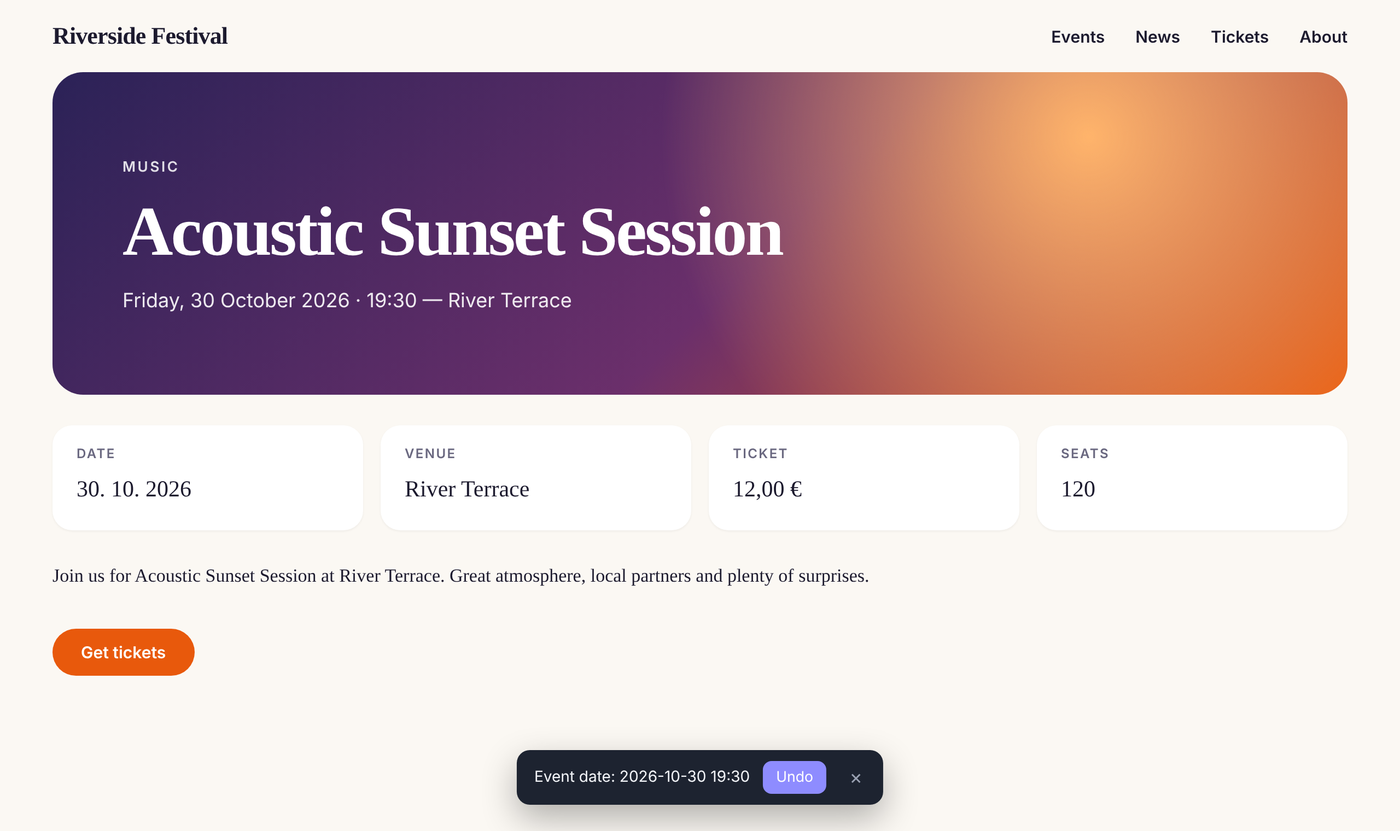
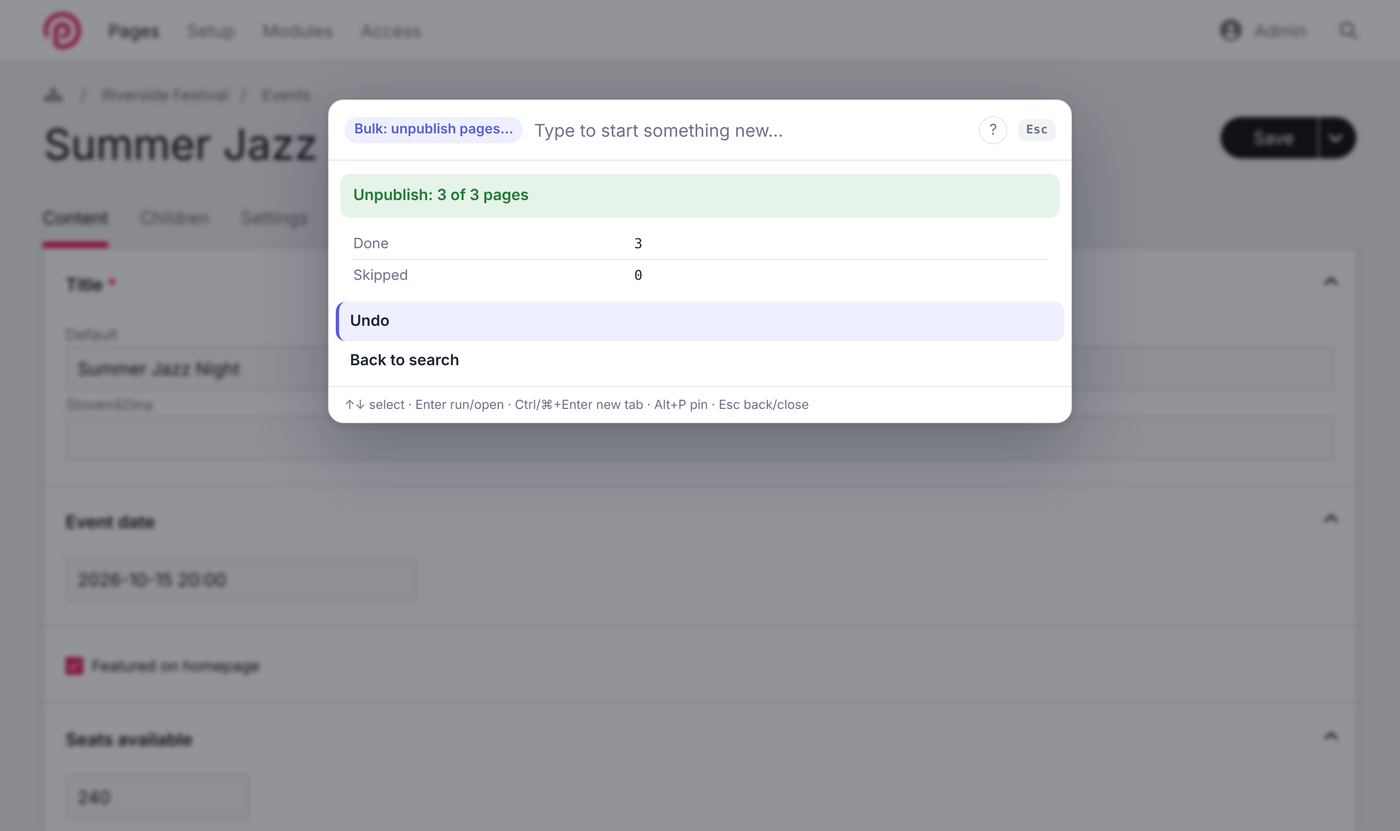
Every change made through the palette (fields, title, status, move, trash, duplicate, new page, whole bulk batches) can be undone: from the toast after the page reloads, from the result screen, or with the Undo command. The last 10 changes are kept per user session; permissions are checked again when undoing.
Bulk actions with selectors
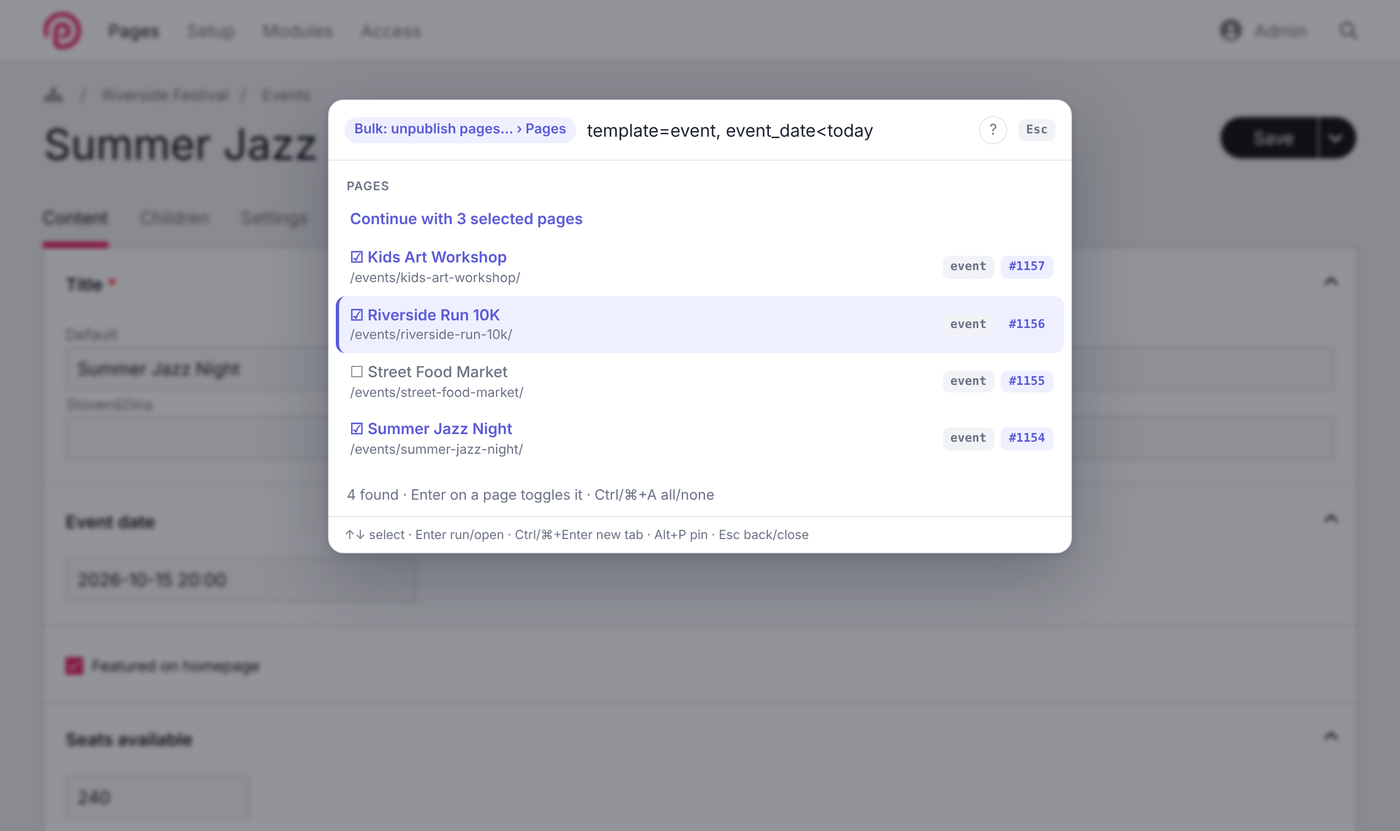
Bulk: publish / unpublish / hide / show / move / trash / set field on any set of pages. Pick them with words (news) or a real selector (template=event, date<today). All pages you may edit are pre-selected (up to 500); untick the ones to keep, Ctrl/⌘+A for all/none. Every page is checked individually, you get a done / skipped (and why) summary, and one Undo reverses the whole batch.
 |  |
Search & jump
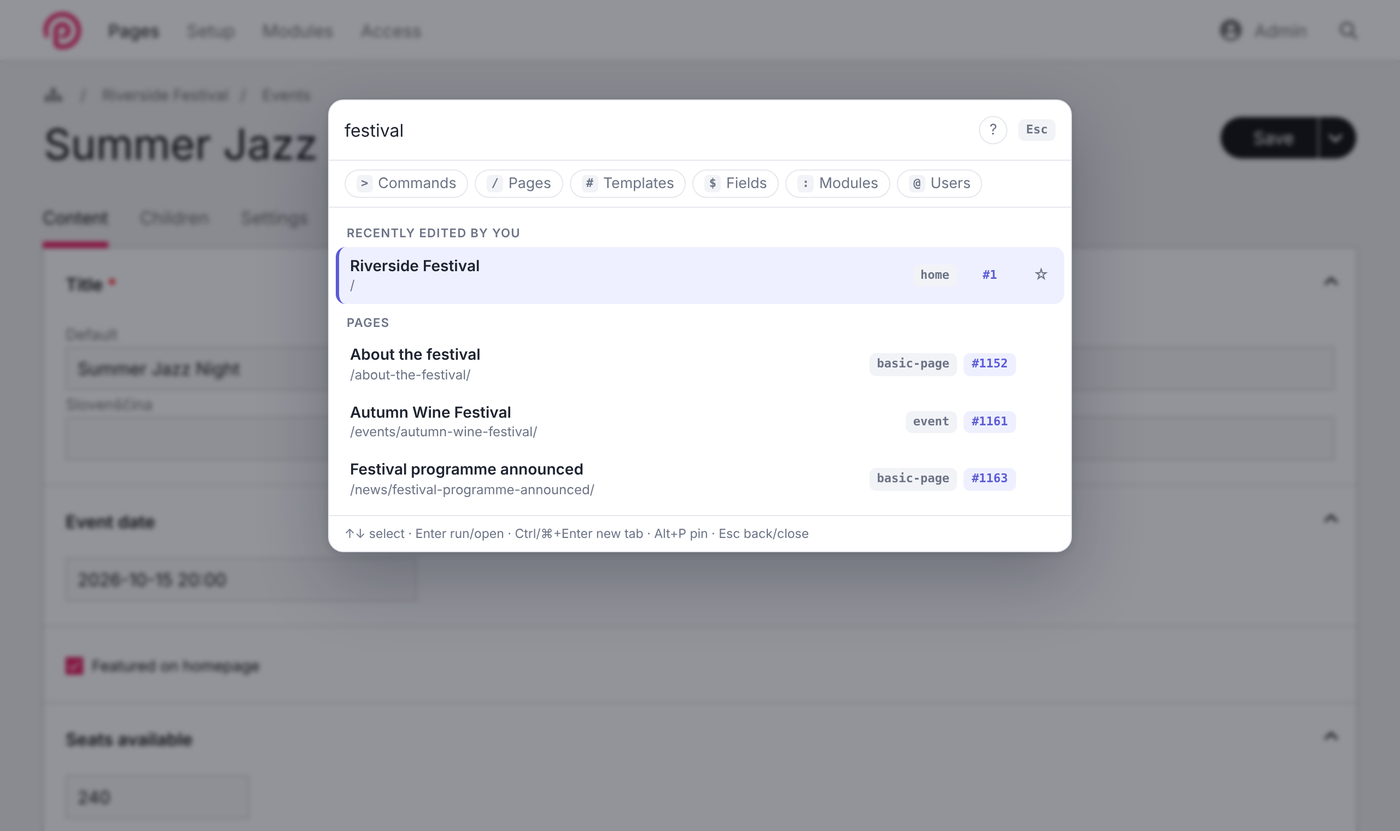
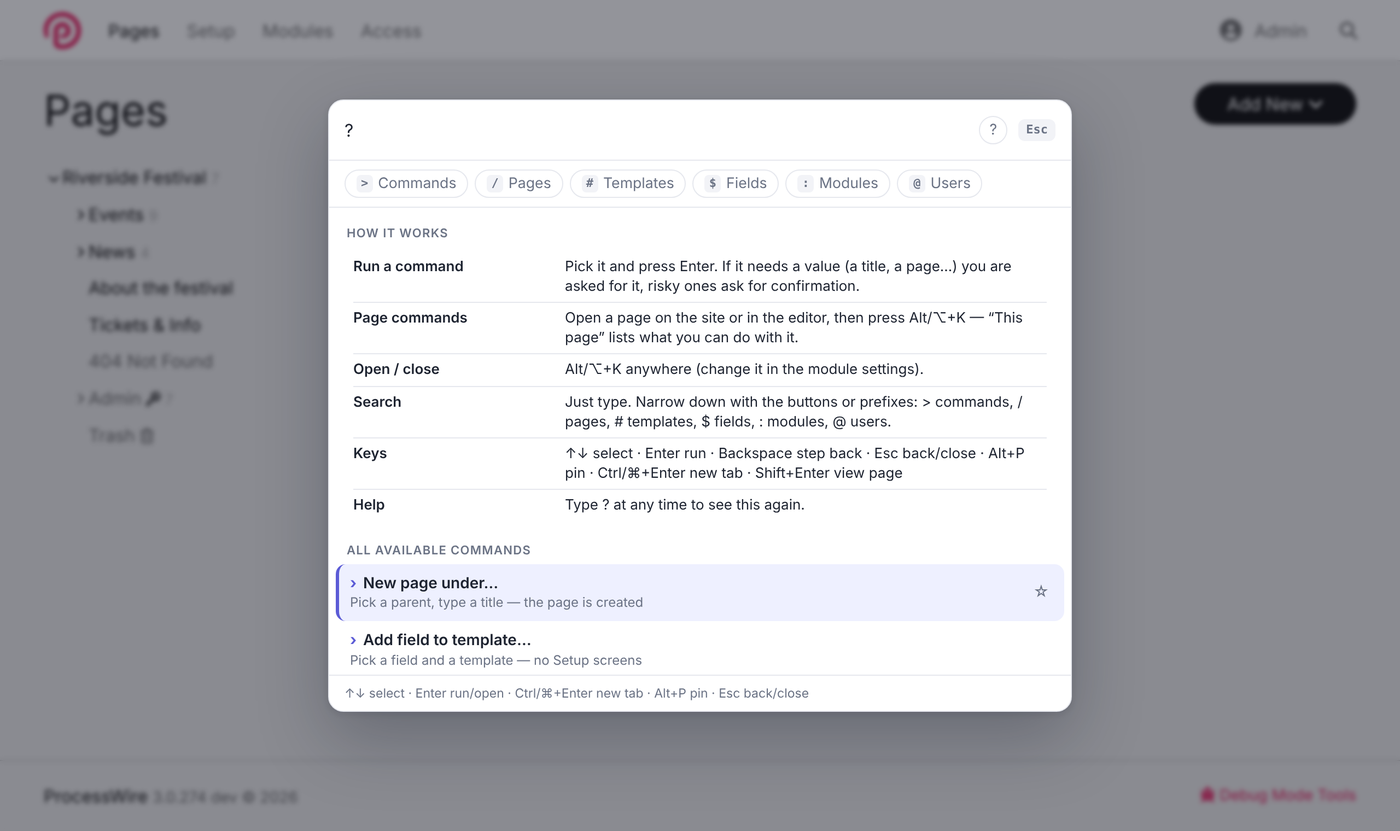
Pages (title, name, ID, template or a selector), every admin screen including module sub-screens, templates, fields, modules and users. Every page shows its template and ID — click the #ID to copy it. Narrow down with the buttons or prefixes: > commands · / pages · # templates · $ fields · : modules · @ users.
 |  |
And more
- Instant answers: System info, Latest errors and Page info answer inside the palette.
- Global commands: New page under…, Add field to template…, Clear caches (WireCache + ProCache), Refresh modules.
- Shortcuts without code — your own commands in the settings, optionally per role.
- Pins (Alt+P or ☆), recently used items,
?for built-in help, keyboard-only, light & dark mode, Konkat / UIkit friendly.
 |  |
Install
- Download the ZIP (or install from the modules directory with the class name
NativeCommand). - Put the
NativeCommandfolder into/site/modules/, then Modules → Refresh and install Native Command. - Press Alt+K (Option+K on Mac) anywhere. Type
?to see what you can do.
Requirements: ProcessWire 3.0.200+ · PHP 7.4+
Tested with ProcessWire 3.0.200 (MySQL/MariaDB) and 3.0.274 (SQLite), PHP 8.3, classic UIkit and Konkat admin themes, CKEditor and TinyMCE.
Uninstall: nothing is added to your database, templates or fields — uninstalling removes the module and its settings. The optional native-command log file stays in Setup → Logs until you delete it.
Using it
- Alt+K (default) opens and closes the palette, / opens it when no input is focused.
- ↑ ↓ select · Enter run or open · Ctrl/⌘+Enter open in a new tab · Shift+Enter open the page on the front-end.
- Commands that need a value ask for it; Backspace on an empty value steps back, Esc returns to search, Esc again closes.
- Alt+P pins the selected item to the top.
Choosing the shortcut
In the module settings pick a modifier (Alt/Option, Ctrl/Cmd, Ctrl/Cmd+Shift or Ctrl/Cmd+Alt) plus any letter or digit — e.g. Ctrl/Cmd+K or Cmd+P. The key is matched physically, so it works on every keyboard layout, and the palette takes the shortcut so nothing else opens with it. The default is Alt+K because the Konkat admin theme uses Ctrl/Cmd+K for its own search.
Settings
- Basics: shortcut (modifier + key) · open with
/· enable on the front-end · Shortcuts - Advanced: sources (commands, admin screens, pages, templates, fields, modules, users) · results per group · log data-changing commands · list of all registered commands
Shortcuts
One per line — Label | target | roles (optional, comma separated):
New event | new /events/ event | editor
News post | new /news/
Ticket report | https://tickets.example.com/report
Orders | /processwire/shop/orders/
new /parent/path/ template asks for a title and creates the page there (unpublished, opens in the editor). Without a template it is chosen like Add child page does. A URL target is a link.
Security
- Available to superusers and users with
page-edit. Every command, page and field is checked against the user's permissions on the server, again when it runs (editable(),publishable(),moveable(),trashable(), field-level access…). - Commands run only via POST with ProcessWire's CSRF token; arguments are sanitized by type.
- Selectors typed by users can't widen access:
include,check_access,limit,statusandhas_parentare removed, and non-superusers can't search by fields they're not allowed to view. - Risky commands ask for confirmation; in the editor you're warned about unsaved changes.
- Multi-line, rich-text, hidden and locked fields are never edited in the single-line input.
- Data-changing commands are written to the
native-commandlog (optional). - The front-end needs no inline script, so it also works with a strict Content-Security-Policy.
For developers
Add your own commands from any module or /site/ready.php:
$wire->addHookAfter('NativeCommand::registerCommands', function(HookEvent $e) {
	/** @var NativeCommand $nc */
	$nc = $e->object;

	// read-only answer shown inside the palette
	$nc->addCommand('orders.open', [
		'title' => 'Open orders',
		'permission' => 'order-view',
		'mutates' => false,
		'handler' => function(array $args, ?Page $page, NativeCommand $nc) {
			$rows = [];
			foreach($nc->wire()->pages->find('template=order, paid=0, limit=8') as $o) {
				$rows[] = [$o->title, $o->total . ' €'];
			}
			return ['message' => count($rows) . ' open orders', 'rows' => $rows, 'open' => '/processwire/orders/'];
		},
	]);

	// command with arguments
	$nc->addCommand('orders.new', [
		'title' => 'New order for…',
		'keywords' => 'order create',
		'permission' => 'order-edit',
		'args' => [
			['name' => 'customer', 'type' => 'page', 'label' => 'Customer'],
			['name' => 'amount', 'type' => 'int', 'label' => 'Amount (€)', 'required' => false],
		],
		'handler' => function(array $args, ?Page $page, NativeCommand $nc) {
			$order = $nc->wire()->pages->new(['template' => 'order', 'parent' => '/orders/', 'title' => 'Order for ' . $args['customer']->title]);
			return ['message' => 'Order created', 'redirect' => $order->editUrl()];
		},
	]);

	// command for the page being viewed/edited, with undo
	$nc->addCommand('event.soldout', [
		'title' => 'Mark as sold out',
		'context' => 'page',
		'available' => function(?Page $page) { return $page && $page->template == 'event' && $page->editable('seats'); },
		'handler' => function(array $args, ?Page $page, NativeCommand $nc) {
			$field = $nc->wire()->fields->get('seats');
			$nc->pushUndo('fields', $page, 'Sold out', ['fields' => ['seats' => $field->type->sleepValue($page, $field, $page->getUnformatted('seats'))]]);
			$page->setAndSave('seats', 0);
			return ['message' => 'Sold out', 'reload' => true];
		},
	]);
});
Command definition
| Key | Type | Default | |
|---|---|---|---|
title | string | id | Shown in the palette (end it with “…” when it asks for values) |
summary | string|callable(?Page) | '' | Subtitle |
keywords | string | '' | Extra search words |
context | global|page | global | page = needs the current page |
permission | string | '' | Permission name, or superuser |
available | callable(?Page, NativeCommand): bool | — | Fine-grained visibility, re-checked at run time |
args | array | [] | Each: name, type, label, required (true), default |
confirm | string|callable(?Page) | '' | Adds a confirmation step |
mutates | bool | true | Changes data → logged + unsaved-changes guard |
group | string | auto | Palette group |
handler | callable(array $args, ?Page $page, NativeCommand $nc) | required | Returns a string or a result array |
Argument types: text, int, page (→ Page), template (→ Template), field (→ Field), pages (multi-page picker → PageArray of editable pages), choice (options = callable(?Page, array $previousArgs, string $query, NativeCommand) returning [['value', 'label', 'summary', 'selected'], …], or null for free text with default = callable(?Page, array $previousArgs)). Objects are validated against the user's access before your handler runs. Throw a WireException to show its message as an error.
Result array: message · rows ([[label, value], …]) · open (URL offered as next step) · redirect · reload · type (success|error).
Helpers: bulkRun(PageArray $pages, $title, callable $check, callable $apply) (per-page skip reasons, summary and one combined undo) · pushUndo($type, $page, $label, $data) (types fields, status, parent, trash, created) · movePage($page, $parent) · createChild($parent, $title, ?Template $template) · missingRequired($page) · removeCommand($id) to disable a built-in.
Plain links: hook NativeCommand::getCustomLinks($q, $scope) and return [['t' => 'Title', 's' => 'Subtitle', 'u' => '/url/'], …].
JavaScript: NativeCommand.open(), NativeCommand.close(), NativeCommand.run('cache.clear').
Translations
All texts are translatable: Setup → Languages → (language) → Translate files → NativeCommand.module.php.
Support
Questions, ideas and bug reports: the ProcessWire forum support thread or GitHub issues. Please include your ProcessWire and PHP version.
License
More modules by Roych
NativeAnalytics
Native first-party analytics dashboard for ProcessWire with traffic, compare, exports and event tracking.9Native Forum
A complete community forum for ProcessWire: groups, categories, topics, replies, private messages, moderation, anti-spam, SEO/GEO and ready-made designs.1Native Command
Keyboard command palette (Alt+K) for the admin and the front-end: edit any field, bulk-edit with selectors, undo, search and jump anywhere.1