Login with a PassKey for ProcessWire
ProcessWire module that enables login via a passkey
LoginPassKey for ProcessWire
This module enables users to log in to ProcessWire with a WebAuthn passkey as an alternative to a password.
Table of Contents
- Passwords vs PassKeys
- Features
- How it works (Short version)
- How it works (Long version TLDR;)
- Login entry points
- Installation
- Bundled dependency
- Configuration
- Customising the frontend
- LoginPassKey in Admin
- Credit where it's due
- Like this module?
Passwords vs PassKeys
Passwords:
- Traditional security method using a combination of letters, numbers, and symbols.
- Vulnerable to hacking, phishing, and weak practices like reuse.
- Require users to remember and manage, which can lead to insecure behavior.
- Can be used to log in across multiple, disparate devices.
Passkeys
- A more secure alternative based on public-key cryptography.
- Uses a private key on the user’s device and a public key on the service’s server.
- Eliminates the need to remember passwords, relying on biometric authentication or PINs.
- More resistant to attacks like phishing and keylogging.
- Tied to the user's device, or when used with a passkey manager such as Apple Keychain, can be used on multiple devices using fingerprint, face ID or device PIN.
In short, passkeys offer improved security and convenience compared to traditional passwords.
Features
- Can be enabled for Frontend users only, Admin users only, or both
- Simply install, then configure the module and it is good to go
- The module does not integrate with ProcessWire TFA; if you enforce TFA, test carefully because passkey login uses WebAuthn verification as its own login path
- Supports username/email + passkey and optional passkey-only login with discoverable credentials
How it works (Short version)
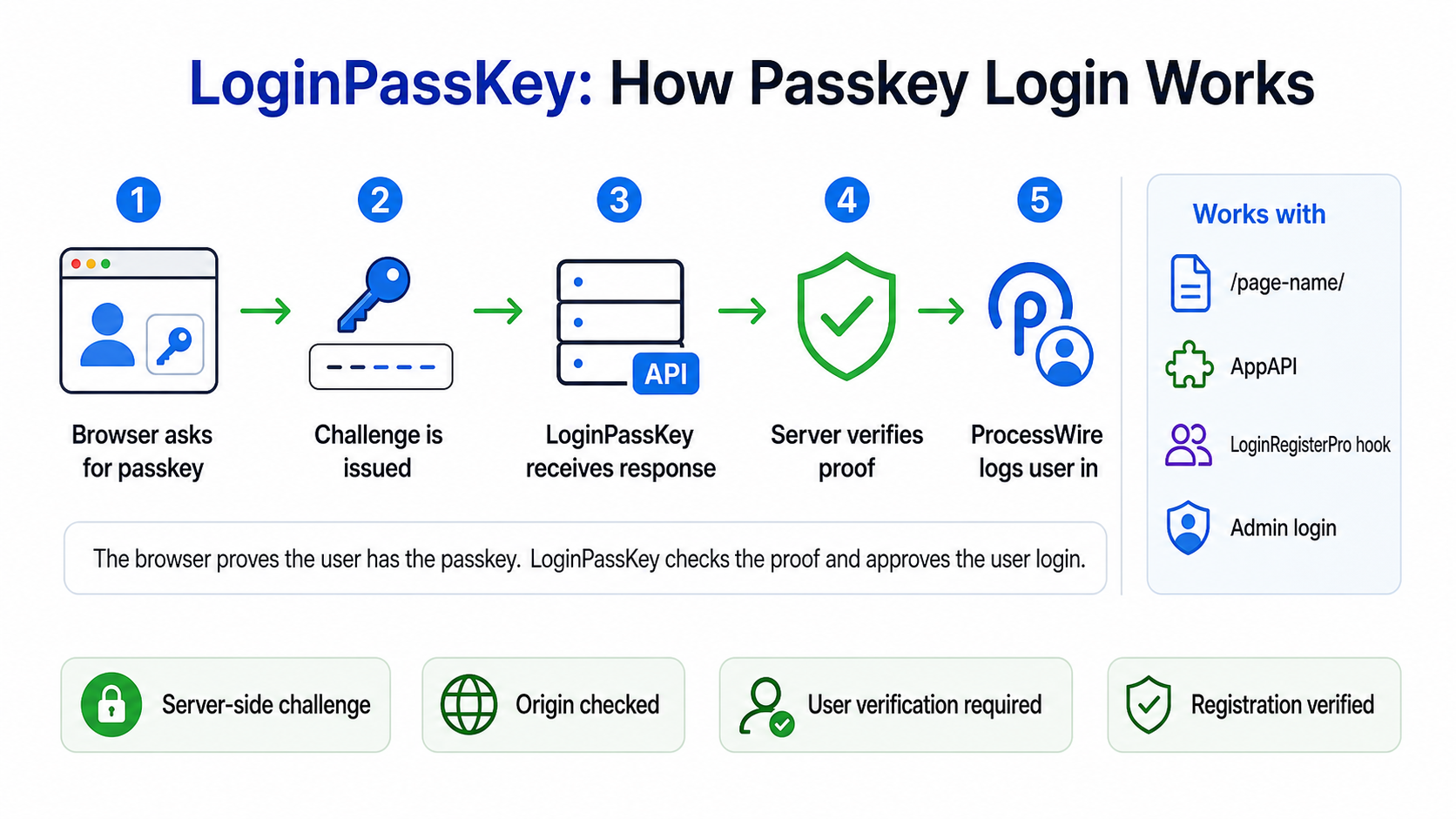
LoginPassKey supports three login methods on the same site:
- username/email + password
- username/email + passkey
- passkey only, when enabled and using discoverable credentials
The browser, server and device have a 3-way conversation answering the following questions, then respond appropriately:
- Who are you, or which discoverable credential did you present?
- What do I do next?
The user must be logged in with a password to register a passkey.
The user must be logged out to verify an existing passkey.
How it works (Long version TLDR;)
For username/email + passkey login, the user clicks a button, then:
- The button click triggers an API call to the server identifying the user by the input value of the username field.
- The server then runs through a series of scenarios regarding the submitted username:
- Username field is empty
- User is not logged in but device does support WebAuthn
- User is not logged in, device supports WebAuthn but username not found
- User is logged in but device does not support WebAuthn
- User is logged in, device supports WebAuthn but user does not yet have a stored passkey credential
- User roles do not match supported roles
- User roles match supported roles, user is not logged in and has a stored passkey credential
- User is logged in but their username does not match username input
- User logged in with passkey
- The user is an admin who wants to add/remove passkeys
The match to these scenarios triggers one of three possible actions:
- Back out now
- Go through the passkey registration process
- Verify the passkey and log in the user
For passkey-only login, the button click starts the discover-start step. The server creates a challenge without allowCredentials, the browser prompts for a discoverable credential, and discover-verify verifies the returned credential, user handle, challenge and signature before logging in the matching ProcessWire user.
For username/email + passkey login, the server includes the user's registered credential IDs in allowCredentials so the browser prompts only for passkeys belonging to that identified user. Passkey-only login intentionally omits allowCredentials so discoverable credentials can be selected.
Verification
After a user enters their passkey (eg, fingerprint) to login, the following are checked:
- the Challenge
- the Client data
- the Public key
- the Signature returned by the device. This is a much tougher nut to crack than a salted password.
- the User id or discoverable credential user handle
- user verification, when configured as required
- the authenticator signature counter, when the authenticator reports one
- a light session-based limit on repeated failed passkey login attempts
Should any of the above tests fail, the user is denied access and to continue the login process, must enter their password.
The login attempt limit is intended to reduce repeated failed attempts in a normal browser session. IP-based or site-wide rate limiting is best handled by the web server, firewall, WAF, or hosting layer, where it can apply consistently to the whole site.
Login entry points
LoginPassKey separates the browser flow from the endpoint that handles each step. The browser-side JavaScript starts at the configured API endpoint and moves through the same start, finduser, register, verify and end steps regardless of where the username/email + passkey login button appears.
When passkey-only login is enabled, the JavaScript uses the additional discover-start and discover-verify steps for WebAuthn discoverable credentials. Existing username/email + passkey login continues to use the original steps.
Supported entry points:
- ProcessWire admin login - enabled with Enable Admin Passkey login. The module adds the passkey button to the default admin login form and uses the configured API endpoint.
- Default
lpk-apipage/template - installed by the module. The template file is copied fromsite/modules/LoginPassKey/lpk-api.phptosite/templates/lpk-api.php. If you customise the installed template, keep the module copy in sync before distributing or reinstalling. - AppApi endpoint - optional alternate endpoint. See
examples/LoginPassKeyAppApi.php. It should expose the same step names and call the same LoginPassKey methods as the defaultlpk-apiendpoint. - LoginRegisterPro - optional frontend integration. It requires a
site/ready.phphook to add passkey buttons and supporting JavaScript to the LoginRegisterPro form. The hook still starts the same LoginPassKey JavaScript flow and uses the configured API endpoint.
All endpoint implementations must preserve the same server-side security checks. In particular, the verification challenge is created by LoginPassKey, stored in the user's session, and consumed during the verify or discover-verify step.
All API steps must be requested with POST. Logged-in passkey registration also requires the registration CSRF token generated by LoginPassKey::getRegisterCsrfToken(). The bundled examples include this token in the registration payload. Guest passkey login steps do not use CSRF tokens; the WebAuthn challenge protects those login ceremonies.
The bundled API endpoints cap JSON request bodies at 64 KB and send JSON response headers including Content-Type: application/json, X-Content-Type-Options: nosniff, Cache-Control: no-store, and Referrer-Policy: no-referrer.
LoginPassKey does not replace ProcessWire's session handling or impose a separate single-session policy. It verifies the passkey login securely, then lets ProcessWire handle the authenticated user session in the normal way.
LoginPassKey does not impose a fixed passkey limit per user. Users with profile-edit permission can manage their own passkeys, and admins can remove passkeys from Access > PassKeys.
When a ProcessWire user is deleted, LoginPassKey deletes that user's stored passkey credential rows.
LoginPassKey keeps passkey-specific logging deliberately minimal. ProcessWire and the web server remain the appropriate places for broader access logs, audit logs, or site-specific monitoring.
Installation
During the installation process, the module creates:
- The API template. The default name is
lpk-apithat includes attributes such as:- one page only,
- no children,
- URL segments enabled for the API steps
start,finduser,register,verify,discover-start,discover-verifyandend, - JSON response content type, and
- disables appending of
_main.php.
- A publicly accessible page which is assigned the
lpk-apitemplate and ishidden. - It is then up to you to create a login page. See
examples/loginpasskey-page-tpl.phpfor inspiration. - An admin page under
Accessto view a list of users who have passkeys and delete passkeys depending on user permissions.
Bundled dependency
LoginPassKey bundles the tested runtime version of lbuchs/webauthn so the module works when installed from GitHub through the ProcessWire module installer. ProcessWire does not run Composer during module installation.
Support applies to LoginPassKey with the bundled, tested dependency version. Composer users may update or replace dependencies themselves, but untested dependency changes are outside the supported module package unless LoginPassKey explicitly updates and ships a new tested bundle.
Upgrading
LoginPassKey upgrade hooks are cumulative. Upgrading directly from an older beta to a current release applies the module's schema/template-setting upgrades, such as enabling URL segments on the installed API template and adding missing database columns.
Upgrade does not overwrite copied endpoint files such as site/templates/lpk-api.php. If you have customised that file, compare it with the current module copy at site/modules/LoginPassKey/lpk-api.php and merge any endpoint contract, header, or request-handling changes you want to keep.
Configuration
The module configuration fields are:
Activate module
- Enable Frontend Passkey login - check to allow frontend users to login with a passkey.
- Enable Admin Passkey login - check to allow admins to login with a passkey.
- Enable passkey-only login - check to allow discoverable credential login without entering a username/email. When enabled, new passkey registrations request discoverable credentials. Existing username/email + passkey logins continue to work.
Authentication options
- Application name - the shortname that some passkey authenticators will display to enable users to differentiate between passkeys.
- Host name - The Replying Party host name. Default is the current
$config->host. - User verification - defaults to
required, which is recommended. Lower settings may allow passkey use without biometric/PIN verification on some authenticators. - Passkey login attempt limit - failed passkey login attempts allowed per browser session within the configured window. Set to
0to disable. - Passkey login attempt window - time window in seconds for the passkey login attempt limit.
ProcessWire user info
- User template (required) - defaults to the system
usertemplate. After saving, any other user templates will display. - Identify user by username or email (required) - defaults to the user template name field. After saving and the user template has email fields, those fields will become available. When choosing an email field, the user may login with their passkey with either their username OR email address in the input field.
- User roles permitted to use WebAuthn (required) - Select all roles for all users. Superuser role MUST be selected to enable Superusers to log in with a passkey. The permission is not set by default.
- Path to your API ENDPOINT (required) - The module will create a template and page for the API by default. Change this path should you prefer another endpoint.
- Page to redirect to on login (Frontend only) - enter the ID or path to the page the user should be directed on frontend login. When blank, the user will be shown the
Homepage.
Customising the frontend
Frontend page template - see loginpasskey-page-tpl.php in the examples folder. The LoginPassKey JavaScript must be present but the layout can be whatever you choose. Button IDs must match the JavaScript selectors.
LoginPassKey with LoginRegisterPro - Requires a hook in site/ready.php; see examples/loginpasskey-for-loginregisterpro-hook.php. The hook adds username/email + passkey and passkey-only buttons to the LoginRegisterPro login form, defines the configured API endpoint for the JavaScript, and can optionally show a passkey registration banner for an eligible logged-in frontend user who has no passkey yet. Button IDs must match the JavaScript selectors. The included markup and script are only an example and may be replaced with your own frontend code.
LoginPassKey with AppApi - See LoginPassKeyAppApi in the examples folder. Copy this file to your AppApi api directory, update your Routes.php (instructions in example) and change the LoginPassKey API ENDPOINT in this module configuration.
API template - see loginpasskey-api-tpl.php in the examples folder. Keep the endpoint step names and JSON response contract intact if you customise it.
LoginPassKey in Admin
When logged into the admin area, a user who is a superuser or has the passkeys permission, the page PassKeys appears as a child page of Access.
Users with this permission can view and/or delete existing passkeys. The list only shows id, user id, username and date created. It does not display any passkey authentication data.
The passkey list is paginated and searched server-side. Search matches passkey ID, user ID, username, and created date.
After password login, eligible admin users without a passkey are shown an explicit registration banner instead of automatic passkey registration.
Users with ProcessWire's profile-edit permission can manage their own passkeys from the admin profile edit screen. The LoginRegisterPro example hook also adds the same self-management UI to the LoginRegisterPro profile form. This self-management section only shows the current user's passkeys, lets them add another passkey, and lets them delete their own passkeys. Superuser/admin recovery remains available through ProcessLoginPassKey.
For custom frontend self-management, templates can check $page->lpkCanSelfManagePasskeys($user) before showing passkey management UI.
IMPORTANT
- LoginPassKey uses technology available in all the big 4 browsers - Chrome, Edge, Firefox and Safari - in versions later than 2023. Older browsers may struggle.
- Do NOT enable TracyDebugger DebugBar for the frontend when testing. The frontend javascripts will conflict. Instead, see https://processwire.com/talk/topic/31110-tracydebugger-session-challenge-conflict/#comment-248134 on how to set up TracyDebugger to monitor frontend guest https requests.
Credit where it's due
This module would not be possible without the help and support from:
- Ryan Cramer for ProcessWire and his comprehensive ProcessWire docs
- The ProcessWire Community Forum, with special mentions to:
- Adrian for his TracyDebugger module and quick replies when I reached out for help
- Bernhard for his knowledge and who is always willing to help
- All forum members who posted solutions to problems I faced creating this module
Like this module?
Please show your appreciation by sending Clip Magic some financial love via PayPal.
More modules by Clip Magic
JSON+LD Schema
This module helps you dynamically create schemas from within your templates. Each schema can be configured to meet your requirements. You can even add your own ProcessWire schema classes to the module6AI Chatbot for ProcessWire
Embeds a configurable AI chatbot powered by AgentTools model configuration on your site.4PayWhirl API
This module is a wrapper that enables you to make requests and implement web hooks with the PayWhirl API from within ProcessWire3Automatically create new pages for recurring events
This module enables you to automatically create pages based on a ProcessWire page template, eg Calender detail page that has calendar event recurrences.2PushAlert Notifications
This module enables you to send and manage push notifications from your ProcessWire 3.0.74+ website.1