Inputfield Selectize
Inputfield for the ProcessWire FieldtypePage.
A Inputfield to provide a select interface for Processwire CMS FieldtypePage using the (awesome) Selectize.js jQuery plugin, by Brian Reavis.
Processwire: http://processwire.com/
Selectize: https://github.com/selectize/selectize.js
Features
- Custom designed options and items for any page select field.
- Your select options can use any field or subfield on the page, but also sub-subfields, or any data you provide, since you are not limited by tag replacement: you control the precise data supplied to the options using a PHP array that returns data to the module, which is in turn supplied in JSON to the select as a
data-dataattribute. - The plugin uses the JSON object for each option meaning you can do whatever you want with that data in designing your options/items.
- Each instance lets you define which fields are searchable for the select
- Your selects can use display logic based on the value of any field/data item, for example using ternery conditionals you can avoid empty parenthesis.
- You can design the options and items (what is seen once an option is selected) independently of each other. Therefore you could have special fields on the options for searching, but exclude those on the item. Likewise you can show elements on your item like an edit button which is not needed on the option.
- Multiselect pages are sortable, and deletable by backspace or optional remove button.
- When AceExtended editor is installed, the module will use that for the code input fields.
Usage
- Install the Module
- Edit your pagefield and choose
InputfieldSelectizeas inputfield.
Notes
- For examples of what you can do with your selects, view the plugin site at http://selectize.github.io/selectize.js/.
- The plugin theme is selected on the required JquerySelectize module
Selectize with Ajax (InputfieldSelectizeAjax)
For Page fields with too many selectable pages to load up front. It extends the core
InputfieldPageAutocomplete, so the usual autocomplete settings (selectable pages, search
fields, operator) apply, and options are loaded from ProcessPageSearch as you type.
Requires ProcessWire 3.0.238 or newer for the PHP data array and display fields to reach
search results (older versions only get what ProcessPageSearch returns itself).
- Search fields: the fields matched against what you type (core autocomplete setting). Results are shown as ProcessPageSearch returns them; they are not filtered again in the browser, so the search fields don't need to be in the item data.
- Display fields: fields added to each item, e.g.
title show_type images.- A Page field gives an object:
item.show_type.title,item.show_type.path,item.show_type.id,item.show_type.name. field.subfieldgives just that value under the field name:show_type.titlegivesitem.show_typeas a string.- An image field gives
item.thumbUrl(100x100). - Checkboxes come back as 0/1, integers as numbers.
- A Page field gives an object:
- PHP data array: evaluated for each page (
$page) and merged over the display fields, for selected items and for search results alike. - Every item also has
id,editUrlandtitle(from the data, else the field's label format or label field). - Placeholder when items are selected (multi-value fields): Selectize removes the placeholder once an item is selected; enter text here (e.g. "Type here to add another…") to keep one.
Examples
Basic Example
PHP:
$data = array(
    'title' => $page->title,
    'company' => $page->company_select ? $page->company_select->title : 'Not set',
    'total' => count($page->recipients),
    'editUrl' => $page->editUrl
);

return $data;
Javascript (item and option same)
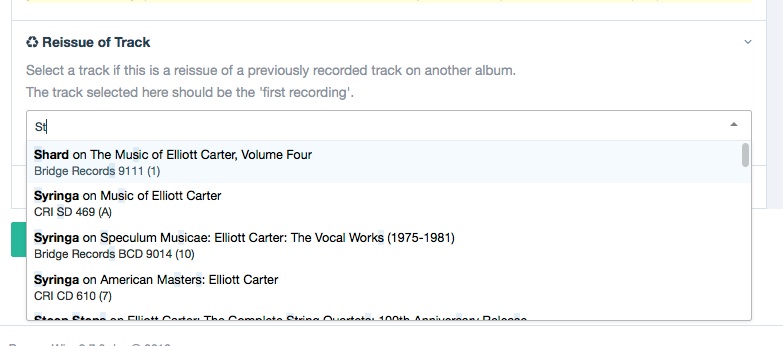
'<div>' +
'<span style="display:block;font-size:14px;font-weight:bold;">' + escape(item.title)  + ' (' + escape(item.total) + ')</span>' +
'<span>' + escape(item.company) + '</span>' +
'</div>'
Example screenshot:
A more advanced example
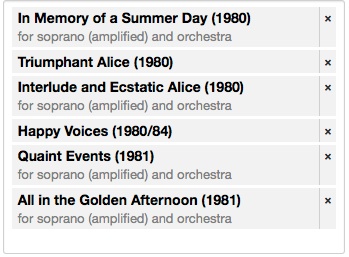
This example shows how to use conditionals for the PHP and JS to get the select options to look clean and provide the necessary information to assist users in choosing the correct options:
PHP
$data = array(
  'title' => $page->title,
  'year' => $page->year ?: $page->year_sort,
  'for_inst' => $page->for_inst,
  'edit_href' => $page->editUrl
);

return $data;
Item:
'<div>' +
'<div style="color: black; font-size: 14px;"><span style="font-weight:bold;">' + escape(item.title) + ' (' + escape(item.year) + ')</span>' +
' <a href="' + escape(item.edit_href) + '">Edit <i></i></a></div>' +
(item.for_inst ? '<div style="color:gray;">for ' + escape(item.for_inst) + '</div>' : '') +
'</div>'
Option:
'<div style="width:100%;">' +
'<div style="color: black; font-size: 14px;"><span style="font-weight:bold;">' + escape(item.title) + ' (' + escape(item.year) + ')</div>' +
(item.for_inst ? '<div style="color:gray;">for ' + escape(item.for_inst) + '</div>' : '') +
'</div>'
Example with images
In this example the selects will feature a thumbnail image:
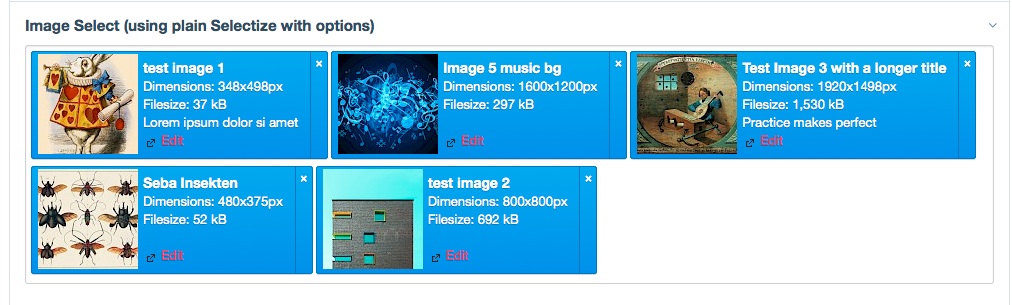
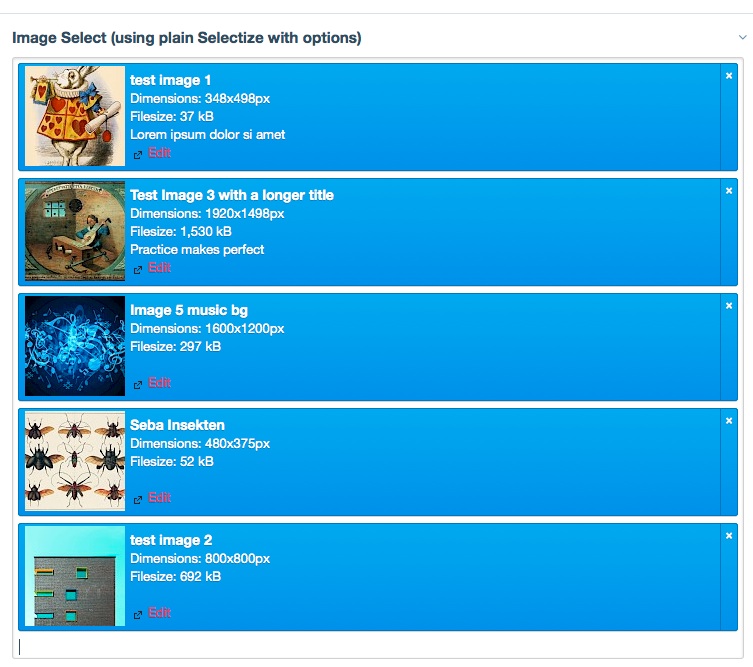
You could also set the width of the selected item to 100% depending on where you place the field (e.g. in a column)
$image = $page->images->first();
$thumb = $image->size(100,100);

$data = array(
	'title'       => $page->title,
    'thumb_src'   => $thumb ->url,
    'img_dims'    => $image->width . 'x' . $image->height,
    'img_desc'    => $image->description,
    'img_size'    => $image->filesizeStr,
    'edit_src'	  => $page->editUrl
);

return $data;
'<div style="width:100%;">' +
'<div style="float:left;"><img src="' + escape(item.thumb_src) + '" alt=""></div>' +
'<div style="float:left; padding:5px;">' +
'<span style="font-size:14px;font-weight:bold">' + escape(item.title) + '</span><br>' +
'<span>Dimensions: ' + escape(item.img_dims) + 'px</span><br>' +
'<span>Filesize: ' + escape(item.img_size) + '</span><br>' +
'<span>' + escape(item.img_desc) + '</span><br>' +
'<a href="' + escape(item.edit_src) +
'">Edit <span></span></a></div>' +
'</div>''<div>' +
'<div style="float:left;"><img src="' + escape(item.thumb_src) + '" alt=""></div>' +
'<div style="float:left; padding:5px;">' +
'<span style="font-size:14px;font-weight:bold">' + escape(item.title) + '</span><br>' +
'</div>' +
'</div>'More modules by Macrura
Soundmanager2 Audio for Proceswire
Use file field to add audio files, use shortcode to insert into RTE.6Import External Images
For content pasted in textarea fields, this will import external images to the images field.6