Video Files
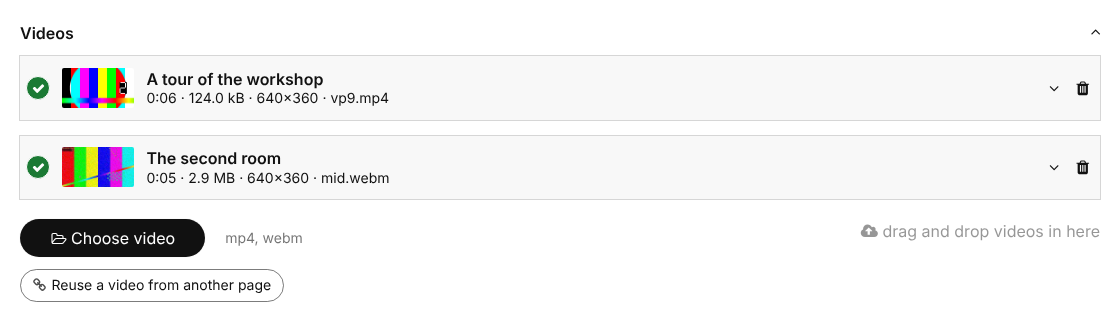
Field that stores one or more self-hosted video files, with title, duration, dimensions, tags and reuse across pages.
A field for self-hosted video files for the ProcessWire CMS, shown in the module list as Video Files. It builds on the core file field, so uploading, descriptions, tags, sorting and multi-language support work the way editors know them. The videos stay on your own server: no external video platform, no cookies, nothing sent to others.
The documentation of every detail is in docs/DOCUMENTATION.md.
Requirements
- ProcessWire>=3.0.227
- PHP>=8.1
- No ffmpeg and no PHP extensions beyond what ProcessWire needs
Purpose of this module
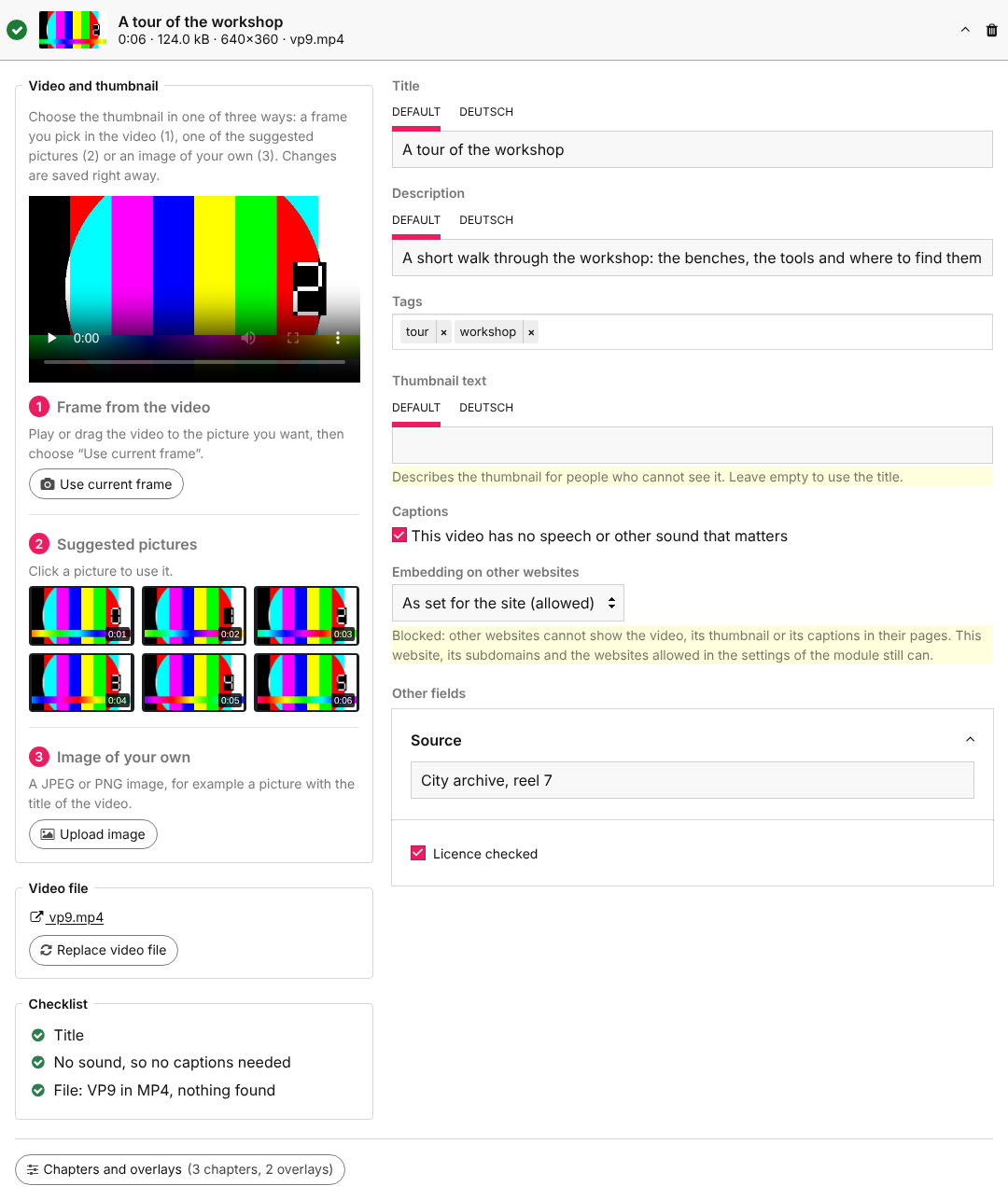
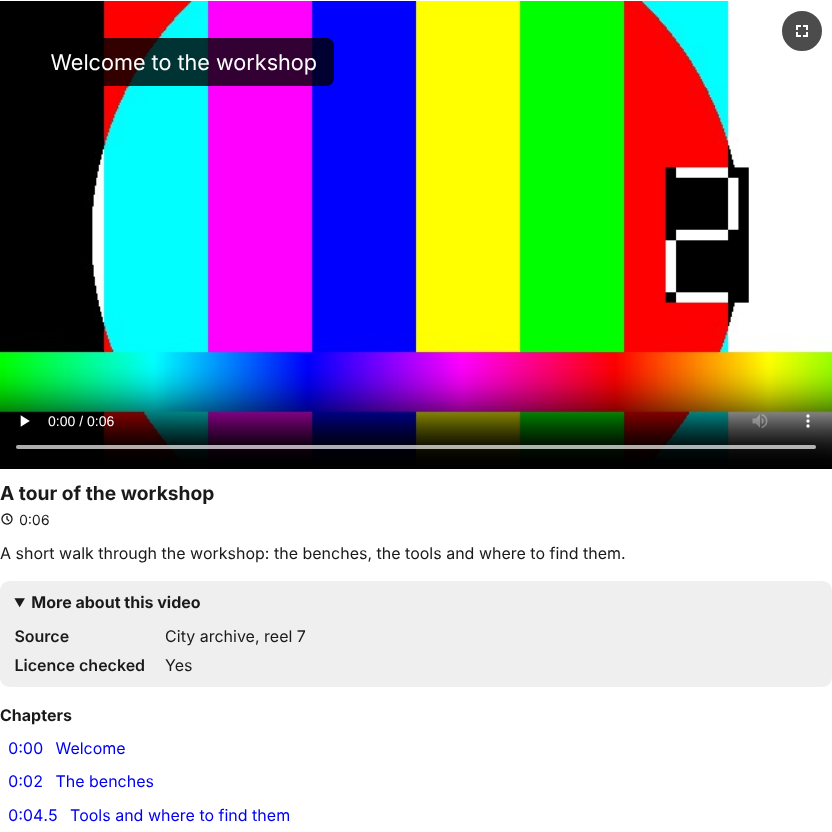
Editors upload a video to a page like any other file, add a title, a description, captions and chapters, and the website shows it in an accessible player. Large files, slow connections and search engines are looked after by the module.
Benefits
- Upload of large files in parts, which goes on after an interrupted connection; a video can be replaced and keeps all its details
- A checklist per video (title, captions, format, size, picture, search engines) tells the editor what is still to do
- Thumbnail made in the browser, duration and dimensions read from the file
- MP4 files are prepared for streaming, so that a video starts before it is fully loaded
- Captions (WebVTT and SubRip) in several languages, with a transcript below the video
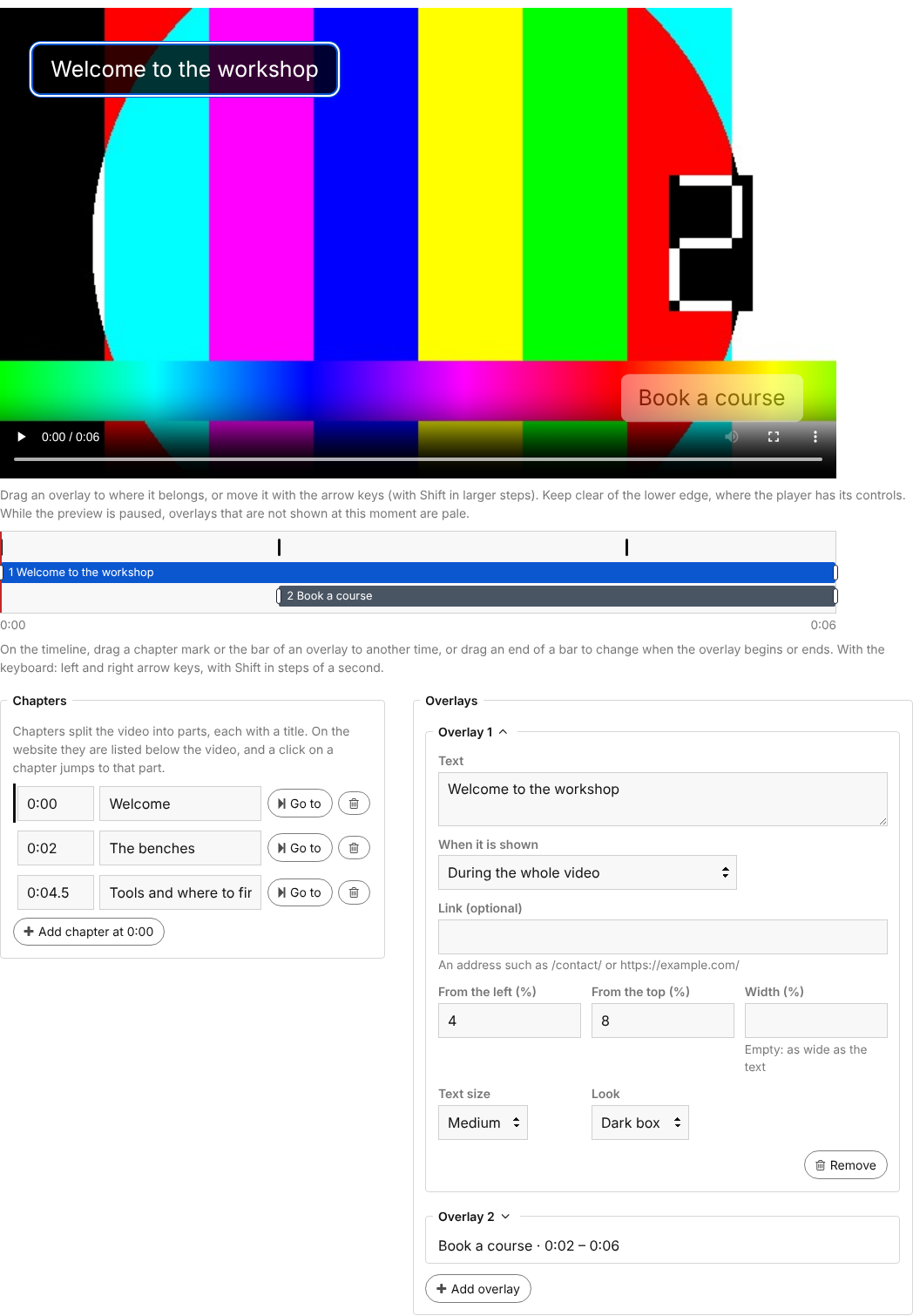
- Chapters and overlays (text and links at a moment of the video) with an editor and a preview
- Output with one line of code: lazy loading, a stable size while the page loads, one video plays at a time
- Structured data (
VideoObject), Open Graph tags and an optional video sitemap for search engines - Videos in a text with a tag and a button in TinyMCE and CKEditor
- Protected videos for pages that only some visitors may see, and a setting against embedding on other websites
- Anonymous play statistics per video, without cookies
- Reuse of a video on other pages without a second copy of the file
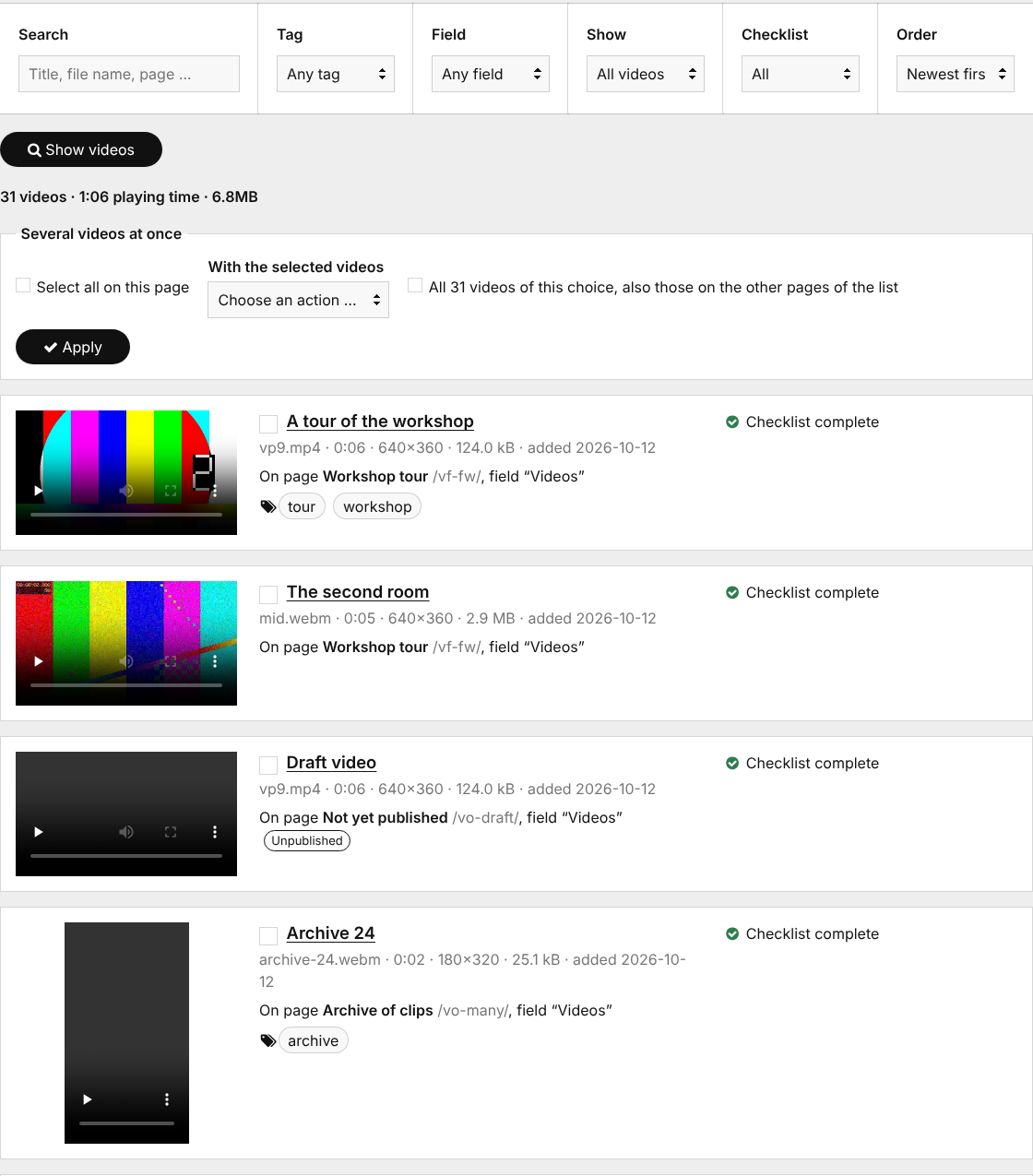
- An overview of all videos of the site in the admin (Setup > Video Manager)
- Class names for UIkit 3, Bootstrap 5 and Bulma; more frameworks as one file each
- German translation included
Screenshots
In the page editor
Chapters and overlays
On the website
The overview of all videos
How to install
- Download the module and place the folder named "FieldtypeSelfHostedVideo" in /site/modules/.
- In the admin control panel, go to Modules and click "Refresh". Find Video Files and click "Install". The video input, the Video Manager (Setup > Video Manager) and the text formatter "Videos in text" are installed along with it.
- Create a new field under Setup > Fields with the type Single video or Multiple videos.
- Add the field to a template.
New fields accept mp4, webm and mov files. The Video Manager is open to superusers; for other users give a role the
permission video-overview.
Output on the website
echo $page->videos->render();                      // all videos of a field
echo $page->video->render();                       // a single video field
echo $video->render([ 'description' => false ]);   // with options
render() returns a native <video> element with the browser's own controls and, below it, title, duration,
description, transcript and chapters. Each part can be switched off with an option, for example:
echo $video->render([
    'autoplay'   => false,
    'loop'       => false,
    'lazy'       => true,       // false for a video at the top of a page
    'caption'    => true,       // title, duration and description below the video
    'transcript' => true,       // the text of the captions, in a box that opens
    'chapters'   => true,
    'overlays'   => true,
    'start'      => '1:23',     // moment to start at
    'framework'  => 'uikit3',   // class names of a CSS framework
]);
A video as a background of a section:
<section><?= $page->hero_video->render([ 'background' => true, 'shade' => 0.4 ]) ?></section>
A visitor who comes back goes on where they stopped, and a link such as /page/?t=83 starts a video at a moment.
What each video knows
foreach($page->videos as $video) {
    echo $video->url;          // /site/assets/files/1234/intro.mp4
    echo $video->title;        // title in the current language
    echo $video->description;  // description in the current language
    echo $video->durationStr;  // 1:33
    echo $video->width;        // 1920
    echo $video->height;       // 1080
    echo $video->thumb->url;   // the thumbnail, a regular image
}
The video properties are searchable:
$pages->find('videos.duration>60');
$pages->find('videos.tags=tutorial');
$pages->find('videos.ratio<1');         // portrait videos
Captions, chapters and overlays are available as $video->captions(), $video->chapters() and $video->overlays().
Videos in a text
A video of a page can be placed inside the text of the page, so that it stands between paragraphs where the editor wants it.
Add the text formatter Videos in text to a text field (Setup > Fields > the field > Details). From then on
- the rich text editor of the field (TinyMCE or CKEditor) has a button Insert video at the end of its toolbar. It lists the videos of the page, lets the editor choose what is shown below the video (title, duration and description, only the title, or nothing) and the place (left, right, centered, with a width), and writes the tag into the text. With the cursor on a tag, the button changes that tag.
- the text shows a video wherever it has a tag such as
[[video intro.mp4]]. The tag can also be typed by hand or written in Markdown.
[[video intro.mp4]]
[[video intro.mp4 nocaption]]                 without title, duration and description
[[video intro.mp4 align=right width=40]]      beside the text, 40 % wide
[[video intro.mp4 start=1:23 captions=de]]    start at a moment, German captions on
The video has to be in a video field of the same page (uploaded there or reused from another page), so the checklist,
protected videos and the Video Manager keep working for videos in texts too. A video that a text shows is not rendered a second
time by $page->videos->render(). All tag options and the behaviour in detail are in the
documentation.
Module configuration
Under Modules > Video Files:
- Embedding on other websites: allowed or blocked (each video can differ)
- Preparing videos for streaming: on by default
- The CSS framework of the website
- Where the stylesheet and script are added
- Statistics, Open Graph tags, video sitemap and the Video Manager under Setup
Per field you set the allowed file extensions, the data rate and file size from which a video gets a warning, tags and the custom fields of a video.
Protected videos and embedding
Videos on pages that only some visitors may view are given only to those who may see them, if the files of such pages are
protected in ProcessWire ($config->pagefileSecure = true; or per template). Whether other websites may show your videos
with the address of the file is a setting of the module. Details and the rules for Apache and nginx are in the
documentation.
Multi-language
The module supports multiple languages: titles, descriptions and captions can differ per language. A German translation
comes with the module in languages/de.csv; install it in Modules > Site > Video Files. With the module RockLanguage it is
installed with the other translations.
Documentation
- Full documentation: the page editor, all options of
render(), text tags, protected videos, embedding, captions, chapters, search engines, CSS frameworks, the Video Manager, translating the module and upgrading - CHANGELOG.md
How to uninstall
ProcessWire allows to uninstall a fieldtype only when no field uses it. Delete the video fields under Setup > Fields first (this deletes their videos), then uninstall Video Files. The module then removes the video sitemap file it made, its table of the places of the videos and its statistics; the video input, the Video Manager and the text formatter are separate modules, which you uninstall in the same way if ProcessWire does not do it for you.
License
MIT, see LICENSE.
More modules by juergen
FrontendLoginRegister
User login/registration component for ProcessWire using the FrontendForms module.9Openinghours
Fieldtype that stores opening hours for each day of the week (including additional input field for holidays)6FrontendContact
Simple configurable and expandable contact form for ProcessWire based on the FrontendForms module.5Image Placeholder
A configurable module for creating placeholder images by using TrueTypeFonts for the placeholder text3Publish/Unpublish pages
Publish/unpublish, delete or move pages depending on dates and times using LazyCron.3Fieldtype Object Dimensions
Fieldtype to store length, width, height and to calculate and store the volume and area of an object.2SnowFallAnimation
Module for creating and animating snowflakes on a web page using HTML5 canvas and JavaScript classes.2Video Files
Field that stores one or more self-hosted video files, with title, duration, dimensions, tags and reuse across pages.1