PrevQuality assurance for images in rich text fields
Introduces the new "Markup/HTML with image management" content type option for textarea fields. More
New support for multiple copies of the same module, multiple templates for users, and multiple parents for users.
There have always been instances where some people want to modify a core module to suit a particular need. But they may have avoided it because their changes could get overwritten on the next core upgrade, making it kind of a hassle. This weeks update enables you to have multiple copies of the same module in your ProcessWire installation, along with the ability to easily switch between them. Here's how:
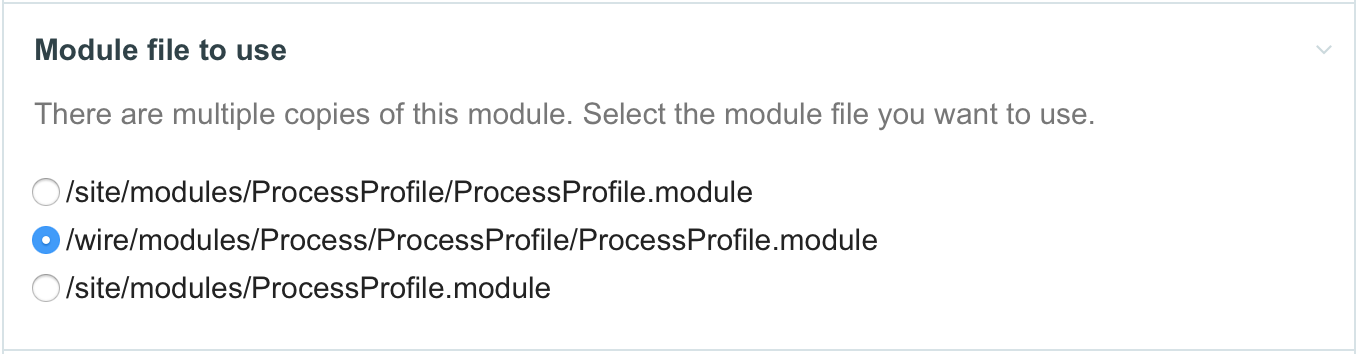
There's no requirement that the duplicate module(s) be from the core. You can also have multiple copies of the same non-core module in your /site/modules/ directory too, so long as they are under different directories. But I anticipate most use cases for this feature will be to make custom modifications to core modules. For example:
Those are just examples, but hopefully enough to demonstrate some of the potential.
This week we also added the ability for users in ProcessWire to have alternate templates or even alternate parents. This could be particularly useful if you want to have different fields of information maintained for different types of users. Since you can now utilize different templates, you can likewise attach entirely different sets of fields to them. Though note that some fields are required for users (pass, roles, admin_theme).
You can also now have different parents for users. One situation where you might find this useful is if you want your 'user' pages to represent URLs on the front-end of your site. For instance, if you were running a publication with lots of authors, you might like for those 'author' users and their biography pages to be one and the same. That's just one example of many possible use cases.
Currently it's a little bit verbose to get this going, but I'll describe it below in case anyone is interested in giving it a try. When we get a little further along with it, we'll likely setup something more automated that can do most of these steps for you. But the system is fully functional if you'd like to give it a try. These instructions below describe setting up both an alternate template and an alternate parent for users. But if you just need an alternate template, you can do that even more easily.
1. First, make sure you are running the latest copy of the dev branch (2.5.14). Then enable advanced mode in your /site/config.php file:
$config->advanced = true; 2. Next, edit the "user" template (Setup > Templates), and do the following:
3. Create a new template that we will use for the alternate users parent page (Setup > Templates > Add New).
4. Create a new page using your new template you just created in step 3.
5. Edit the "user_1" template (Setup > Templates > user_1) that you created in step 2.
6. Edit your /site/config.php file and add the following:
$config->userTemplateIDs = array(3, 111);
$config->usersPageIDs = array(29, 222);
7. Go to Access > Users > Add New, and add a new user. You should now have a choice of template and parent.
8. After creating a new user and assigning one or more roles, you should now be able to login with that user. You can add as many other user templates or parents as you'd like using the same instructions.
9. Undo what you did in step 1 by turning off advanced module (this is not something you want to leave on).
Special thanks to Avoine for sponsoring this users system update and thanks to Antti Peisa for coming up with the idea.
Introduces the new "Markup/HTML with image management" content type option for textarea fields. More
Blogging about Logging–New log viewing feature in the ProcessWire admin, new capabilities added to $log API variable, new ability to create fields from your template editor and new core module for icon selection. More
“We chose ProcessWire because of its excellent architecture, modular extensibility and the internal API. The CMS offers the necessary flexibility and performance for such a complex website like superbude.de. ProcessWire offers options that are only available for larger systems, such as Drupal, and allows a much slimmer development process.” —xport communication GmbH
Adrian
"For instance, if you were running a publication with lots of authors, you might like for those 'author' users and their biography pages to be one and the same. That's just one example of many possible use cases."
That is absolutely awesome - I have struggled with this issue many times - thanks Ryan!!
Reply
ryan
Glad you like it. Btw, URL segments are another good/easy way to link biography pages to users. By that, I mean having an /authors/ page that accepts a URL segment, like /authors/adrian/, where "adrian" would be $input->urlSegment1. The template used on the authors page would do a $u = $users->get($input->urlSegment1); and output any bio fields as appropriate. Of course, double check that the user is a valid one to display a bio for.
Reply
Adrian
Thanks - yeah I have done things like that but it still means maintaining two trees of users, one under Admin > Users and one under Authors. This new approach sounds much cleaner, so thanks to you and Antti and Avoine.
Reply
hellomoto
No I do this too without maintaining two trees of users: /authors/ is just a single page and the urlSegment1 is only set to accept users' names with the role=author, pulling whatever info from their native user profile. But now with this flexibility with user templates and fields, that's better for if you have different types of users that require different types of fields... Like while authors might have bios, maybe subscribers/commenters shouldn't, but should have favorite authors...
But I wonder about the hierarchy part.
Reply
ryan
Thanks Pete. That's correct: the users page checks the userTemplateIDs and usersPageIDs config variables to locate where the users are in the system.
Reply
Pete
This is great - I guess the Users page now simply checks the $config->userTemplateIDs to find all users wherever they may now be hiding?
Another elegant solution giving more choice to us devs - it wasn't anything to do with what I'm working on by any chance, was it? ;)
Reply
steffen
Yet, as I found out, the usersPagesIDs are necessary for the login proecss?
As a temporary hack I just fetched the according IDs per plain sql-queries ?
(https://processwire.com/talk/topic/9034-regarding-config-userspageids-of-new-user-templates-in-2514-the-right-hook/)
Reply
Steffen
Great work!
So, I assume "$config->usersPageIDs = array(29, 222);" is only necessary for adding new users of the new kind via "Access > Users > Add New"?
When I leave that line out in /site/config.php but I have added new user templates, those new kinds of users will be recognized as users?
Reply
Ryan
That's correct, those usersPageIDs are just for determining what parents are allowed for users. If you don't need multiple parents, then simply don't set a value for it and the default will be used instead. I think the userTemplateIDs option is the more useful of the two.
Reply
Alexander
It's okay that new users from /members/ not showing in "Created by User" in page edit or I just do something wrong?
Reply
Can
- 8 years ago
- 20
★★★★★I really love multiple parents/templates for users! Am using this feature more and more =)
Reply