6 February 2026 by Ryan Cramer
Everything you need to know about custom page classes, from beginner to advanced. You'll find time saving tips and tricks, pitfalls, best practices, and plenty of examples.
What are custom page classes?
In ProcessWire, every page in your site or application is an instance of a PHP class named Page. Custom page classes enable you to extend that Page with your own version that has your own custom code logic, documentation or features that the Page class does not have. This enables you to have $page objects that have their own type. Rather than just having a Page, you might have a ProductPage, BlogPostPage, SkyscraperPage, etc., each with its own unique methods and features.
Do you need to use custom page classes?
No, they are completely optional. They do have a lot of benefits, which you'll find in this post. But if you are just getting started in ProcessWire, or aren't already learning a little PHP, then you may find that you don't want custom page classes just yet. Or it may be that you never need them. On the other hand, if you are already comfortable with ProcessWire, and a little PHP, then you may find that using custom page classes opens up a whole new object-oriented world of benefits that save you time and effort.
Enabling custom page classes
Custom page classes are automatically enabled on new installations of ProcessWire, at least those that originated with the included site-blank profile that's included with ProcessWire. You can double check by looking in your /site/config.php file. It should have a line that looks like this:
$config->usePageClasses = true;
If you don't see such a line, go ahead and add it. There's no harm in doing so, whether you use custom page classes or not.
Next, check that you have a /site/classes/ directory. If you don't, go ahead and create it. That is where your custom page class files will live.
If you don't already have a /site/classes/HomePage.php file, go ahead and add one:
<?php namespace ProcessWire;
class HomePage extends Page {}
Congratulations! You now have a custom page class for your "home" page. Whenever you have a $page that is the homepage, it will be an instance of HomePage rather than Page.
Please note: all custom page classes or related files mentioned in this post should have the following line at the top of the file:
<?php namespace ProcessWire;
Our HomePage example above already has it, but I figure that we should just mention it once here rather than repeating it in every code example in this post.
How custom page classes are named
Custom page classes use the name of the template used by a page. Specifically, the template name in Pascal case, followed by the word Page. The class is placed in a file of the same name in /site/classes/. Here are some examples:
| Template | Class | File in /site/classes/ |
| home | HomePage | HomePage.php |
| product | ProductPage | ProductPage.php |
| blog-post | BlogPostPage | BlogPostPage.php |
| article | ArticlePage | ArticlePage.php |
| basic-page` | BasicPagePage | BasicPagePage.php |
Custom Page classes in action
Add your own custom methods or properties
You can make your custom Page class do things that a regular Page class can't by adding new custom methods or properties to the class. In the example below, we have a class representing pages using a template named category. It has a custom method numPosts() that returns the number of blog-post pages that have this category selected in a Page reference field named categories.
// /site/classes/CategoryPage.php
class CategoryPage extends Page {
  // get number of posts using this category
  public function numPosts() {
    return $this->wire()->pages->count(
     "template=blog-post, categories=$this"
    );
  }
}
With that new method now we can render a list of categories along with a count of how many posts are in each category. And if any categories have zero posts, we can just skip them:
$categories = $pages->find('template=category, sort=name');
foreach($categories as $c) {
  $numPosts = $c->numPosts();
  if(!$numPosts) continue;
  echo "<li><a href='$c->url'>$c->title</a> $numPosts";
}
Perhaps we'd find it convenient for numPosts to be a property, so that we can access it like $c->numPosts. We can do that by extending the get() method to look for it:
// /site/classes/CategoryPage.php
class CategoryPage extends Page {
  public function get($key) {
    if($key === 'numPosts') return $this->numPosts();
    return parent::get($key);
  }
  // get number of posts using this category
  public function numPosts(): int {
    return $this->wire()->pages->count(
     "template=blog-post, categories=$this"
    );
  }
}
Now we can use either the numPosts() method or numPosts property. Having it as a property is convenient because it enables us to use shorter syntax in some instances, such as this:
echo $post->categories->each(
  "<li><a href='{url}'>{title}</a> {numPosts}"
);
Let's move on to another example, this time with the class used by the blog-post template. In the example below, we've added some custom helper methods to our blog-post pages. These helper methods will be useful when working with blog posts from our template files.
// /site/classes/BlogPostPage.php
class BlogPostPage extends Page {

  // get other blog posts related to this one
  public function getRelatedPosts(): PageArray {
    return $this->wire()->pages->find([
      'template' => 'blog-post',
      'categories' => $this->categories,
      'sort' => '-date',
      'id!=' => $this->id
    ]);
  }

  // get the post author's full name
  public function getAuthorName(): string {
    $u = $this->createdUser; // a User object
    return "$u->first_name $u->last_name";
  }

  // get a short excerpt paragraph of the post
  public function getExcerpt(): string {
    $excerpt = $this->summary; // summary is a textarea field
    if(empty($excerpt)) {
      // if no summary, extract excerpt from body field
      $excerpt = $this->wire()->sanitizer->truncate($this->body);
    }
    return $excerpt;
  }

  // return number of words in the post
  public function numWords() {
    $body = strip_tags($this->body);
    return str_word_count($body);
  }
}
It's preferable that your helper methods focus on adding functionality that will be used regularly and in more than one instance. If you add a custom method just for things that you will only call once from the page's template file, then it might not be as big of a benefit having it in the custom page class.
Whatever extras you add in a custom page class, they will be loaded with every instance of the custom page class, whether 1 or 500 of them at once, and whether on the front-end or in the admin. Pages are lightweight and memory efficient, and I usually prefer to keep them that way.
Now let's add a couple of custom properties to the BlogPostPage class. Like we did earlier with the CategoryPage class, we'll override the get() method:
// /site/classes/BlogPostPage.php
class BlogPostPage extends Page {
  public function get($key) {
    if($key === 'authorName') return $this->getAuthorName();
    if($key === 'numWords') return $this->numWords();
    return parent::get($key);
  }
  // ...the rest of the class as shown above
}
Using phpdoc for code completion and type hinting
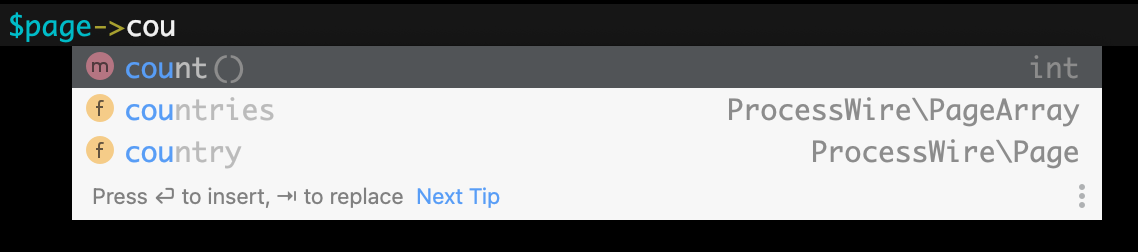
If you are using an IDE (such as PhpStorm), being able to tell your IDE what fields are connected with the custom page class can help immensely when writing code. When you type $page-> your IDE will show you all the fields on the page, so you don't have to remember yourself. And it will also know the type of each field, so it can let you know when you use it incorrectly. This makes life so much easier that it's one of my favorite benefits of using custom page classes.
/**
 * Blog Post Page: /site/classes/BlogPostPage.php
 *
 * @property string $title
 * @property string $summary
 * @property string $body
 * @property string $date
 * @property User|NullPage $author
 * @property PageArray|CategoryPage[] $categories
 * @property-read string $authorName
 * @property-read int $numWords
 *
 */
class BlogPostPage extends Page {
  // ...code as seen earlier
}
Even if you have no need for any custom methods or properties in your page class, it's worth having a custom page class purely for documentation purposes:
/**
 * Home Page: /site/classes/HomePage.php
 *
 * @property string $title
 * @property string $browser_title
 * @property string $meta_description
 * @property string $body
 * @property PageArray $featured_pages
 *
 */
class HomePage extends Page {}
Your IDE likely won't know that a $page is a Page, HomePage, ProductPage, BlogPostPage or some other kind of Page, unless you tell it. You can do that with a little phpdoc. The example below is near the top of my /site/templates/blog-post.php file and it let's my IDE know that $page is a BlogPostPage.
/** @var BlogPostPage $page */
You are likely using blog-post pages elsewhere in the site, so you can do the same there:
$posts = $pages->get('/blog/posts/')->children();

foreach($posts as $post) {
  /** @var BlogPostPage $post */
  echo "<li>$post->title ($post->numWords words)";
}
Here's another way you can do it, by telling the IDE what $posts is:
/** @var BlogPostPage[] $posts */
$posts = $pages->get('/blog/posts/')->children();

foreach($posts as $post) {
  // IDE knows $post is a BlogPostPage
}
Above we told the IDE that $posts is an array of BlogPostPage objects. But that's not entirely accurate, as it's actually a PageArray of BlogPostPage objects. In our case, it doesn't matter, because we don't need the IDE to know that $posts is a PageArray, we just need it to know that it behaves like an array of BlogPostPage objects. But if we did want to use any features unique to PageArray, we could identify it as a PageArray or array of BlogPostPage objects, like this:
/** @var PageArray|BlogPostPage[] $posts */
Improving code quality and reliability by enforcing types
A benefit of using custom page classes is that we can dictate the type in function arguments or return values. If we have a function that's designed only to work with blog-post pages, then we can guarantee that the function won't accept any other types of pages. Following is a procedural function that we use to render a blog-post byline. It accepts the BlogPostPage as an argument, and it will render a byline for that blog-post:
function blogPostByline(BlogPostPage $post): string {
  return "Written by $post->authorName on $post->date";
}
Because we told PHP that $post is a BlogPostPage in the function arguments, it will only accept a BlogPostPage, and the code in the function body can safely know that the $post variable is a BlogPostPage with $authorName and date fields, among others.
Without custom page classes, we wouldn't be able to enforce types in this way. The best we could do is specify that the $post is a Page, but it would accept any kind of Page, so we'd have to add code to check what template it is using.
// life without custom page classes
function blogPostByline(Page $post): string {
  if($post->template->name != 'blog-post') {
    throw new WireException("That's not a blog-post!");
  }
  return "Written by $post->authorName on $post->date";
}
Inheritance with custom page classes
Our examples above have custom page classes that extend the Page class, but if/when it suits your need, you can extend any other class that extends the Page class, including your own custom Page classes.
In our site, let's say that we have pages using the template article and pages using the template blog-post. Pages using the blog-post template have all the same fields as article pages, plus author and date fields. In this case, it might make sense for our BlogPostPage to extend ArticlePage rather than Page:
/**
 * Article Page: /site/classes/ArticlePage.php
 *
 * @property string $title
 * @property string $summary
 * @property string $body
 * @property PageArray|CategoryPage[] $categories
 *
 */
class ArticlePage extends Page {
  // get a short excerpt paragraph of the post
  public function getExcerpt(): string {
    // ...
  }
}
/**
 * /site/classes/BlogPostPage.php
 *
 * @property string $date
 * @property AuthorPage|NullPage $author
 *
 */
class BlogPostPage extends ArticlePage {}
The BlogPostPage class inherits the properties and methods from the ArticlePage class. Our custom getExcerpt() method now exists on all ArticlePage and BlogPostPage objects. And any custom function or method that accepts an ArticlePage will now also accept a BlogPostPage. The function below will render a summary of an article OR a blog-post:
function renderArticleSummary(ArticlePage $p) {
  return
    "<h3><a href='$p->url'>$p->title</a></h3>" .
    "<p>" . $p->getExcerpt() . "</p>" .
    "<ul>" . $p->categories->each("<li>{title}") . "</ul>";
}
Inheriting from other Page base classes
ProcessWire has some built-in classes that already extend Page. If you want to extend ProcessWire's User, Permission, Role, or Language classes, then you'll need to extend those classes rather than Page, like this:
// /site/classes/UserPage.php
class UserPage extends User {}

// /site/classes/PermissionPage.php
class PermissionPage extends Permission {}

// /site/classes/RolePage.php
class RolePage extends Role {}

// /site/classes/LanguagePage.php
class LanguagePage extends Language {}
Of those mentioned above, the most likely to extend would be from User to UserPage.
Using PHP interfaces with custom page classes
Sometimes you might need to have multiple page classes that must have have the same methods, but the implementation inside those methods is completely different and not something that can be inherited or otherwise shared. Yet you want to be able to treat them as a single type in other cases, so that the same code can accept these pages as arguments, and operate upon them in the same way, without needing to know anything about the internal implementation of them.
In this case, it can be useful to declare a common interface for them and then make them all implement that interface. First we create the interface that declares what our required methods will be:
/**
 * TourPage interface: /site/classes/TourPage.php
 *
 * Required interface for [Type]TourPage classes
 *
 */
interface TourPage {
  public function getDepartures(int $month, int $year): array;
  public function getTourType(): string;
}
Now we can create custom Page classes that implement that interface, and thus will be acceptable to any code that requires a TourPage:
/**
 * Boat Tour Page: /site/classes/BoatTourPage.php
 *
 */
class BoatTourPage implements TourPage extends Page {
  public function getDepartures(int $month, int $year): array {
    $departures = [ /* get departures from ACME web service */ ];
    return $departures;
  }
  public function getTourType() {
    return "Tour by boat";
  }
}
/**
 * Bike Tour Page: /site/classes/BikeTourPage.php
 *
 */
class BikeTourPage implements TourPage extends Page {
  public function getDepartures(int $month, int $year): array {
    $departures = [ /* get departures from XYZ Inc. web service */ ];
    return $departures;
  }
  public function getTourType() {
    return "Biking tour";
  }
}
Now we can write code that works with any class that implements the TourPage interface:
function renderTourInfo(TourPage $tour) {
  $month = date('n');
  $year = date('Y');
  echo "<h2>$tour->title</h2>";
  echo "<h3>" . $tour->getTourType() . "</h3>";
  $departures = $tour->getDepartures($month, $year);
  foreach($departures as $departure) {
    // render list of departures
    echo "<li>$departure->date $departure->time";
  }
}
Should we add another Tour type later, like BirdTour, HelicopterTour, WineTour, etc., the same existing code will work with it so long as it implements our TourPage interface.
Extending Repeater page classes
ProcessWire also lets you use custom Page classes for Repeater items, Repeater Matrix items, or a FieldsetPage. It's just a simple matter of naming, which is demonstrated below for each of these field types:
/**
 * /site/classes/QuotesRepeaterPage.php
 *
 * Custom page class for items in repeater field named 'quotes'
 *
 * @property string $quote
 * @property string $cite
 *
 */
class QuotesRepeaterPage extends RepeaterPage {}
/**
 * /site/classes/FooBarRepeaterMatrixPage.php
 *
 * Used for items in repeater matrix field named 'foo_bar'
 *
 * @property string $foo
 * @property string $bar
 *
 */
class FooBarRepeaterMatrixPage extends RepeaterMatrixPage {}
/**
 * /site/classes/SeoFieldsetPage.php
 *
 * Used for FieldsetPage field named 'seo'
 *
 * @property string $browser_title
 * @property string $meta_description
 * @property bool $noIndex
 *
 */
class SeoFieldsetPage extends FieldsetPage {}
Using the built in DefaultPage class
If you create a DefaultPage class in /site/classes/DefaultPage.php then ProcessWire will use it rather than the Page class for any pages that don't already have a custom class. So if there's some functionality you want to add to all Page classes, this might be a good place to do it. You might also want to have your own custom Page classes extend DefaultPage rather than Page, so that your custom Page classes can also inherit whatever is in DefaultPage.
/**
 * Default Page: /site/classes/DefaultPage.php
 *
 */
class DefaultPage extends Page {
  public function getLastModified() {
    // i.e. "5 days ago by ryan"
    return wireRelativeTimeStr($this->modified) .
      ' by ' . $this->modifiedUser->name;
  }
}
Using Page class hookable methods
Another benefit of using custom page classes is that it makes it simpler to target hookable methods for pages of a specific type. Especially in ProcessWire 3.0.255+ which has a large amount of useful hookable methods in Page. With custom page classes, our hook definition can communicate exactly what kind of Page we want to hook. And that would beProductPage in this example below, which lives in /site/ready.php.
$wire->addHookBefore('ProductPage::saveReady', function($e) {
  $product = $e->object; /** @var ProductPage $product */
  if($product->num_available > 0) {
    if($product->isHidden()) $product->removeStatus('hidden');
  } else if(!$product->isHidden()) {
    $product->addStatus('hidden');
  }
});
Because we added our hook as ProductPage::saveReady rather than Page::saveReady, that guarantees that the hook code will only ever receive ProductPage objects. Below are a couple more hook examples, this time with BlogPostPage.
// when blog post is deleted check if any categories should be hidden
$wire->addHook('BlogPostPage::deleteReady', function($e) {
  $p = $e->object; /** @var BlogPostPage $p */
  foreach($post->categories as $c) {
    // determine if any other posts have this category
    $n = pages()->count("template=blog-post, categories=$c, id!=$p");
    if(!$n && !$c->isHidden()) {
      // set category as hidden if it has no posts left
      $c->addStatus('hidden');
      $c->save('status');
    }
  }
});

// when blog post is saved unhide hidden categories
$wire->addHook('BlogPostPage::saved', function($e) {
  $p = $e->object; /** @var BlogPostPage $p */
  foreach($p->categories as $c) {
    if($c->isHidden()) {
      // unhide any hidden categories used by this post
      $c->removeStatus('hidden');
      $c->save('status');
    }
  }
});
Adding your own hookable methods
Any classes in ProcessWire can have hookable methods, and custom page classes are no exception. You can add hookable methods in custom page classes the same way as anywhere else in ProcessWire, by prepending 3 underscores to the method name…
/**
 * @method string hello()
 *
 */
class HelloPage extends Page {
  public function ___hello() {
    return 'hello';
  }
}
…and here's an example of hooking the method we added above. It's kind of a silly example, it just appends the word "world" to whatever was returned by the hello() method:
$wire->addHookAfter('HelloPage::hello', function($e) {
  $e->return .= " world"; // i.e. "hello world"
});
If you add a hook for a method that doesn't exist, then you just added your own new method to the class (and your new method is itself hookable too)…
$wire->addHook('HelloPage::world', function($e) {
  $e->return = "it’s a small world";
});
Example of using the new method:
$p = $pages->findOne('template=hello');
if($p->id) echo $p->world(); // it’s a small world
…though the above is hardly necessary: we don't need to add new methods with hooks when we can add them to the custom page class directly, like this:
/**
 * @method string world()
 *
 */
class HelloPage extends Page {
  public function ___world() {
    return "it’s a small world";
  }
}
…so custom page classes can reduce the number of instances where we would need to add methods with hooks.
Best practices with custom page classes
Avoid repeating your method implementations
When using custom page classes, sometimes we find that we want to add the same method to multiple custom page classes. For example:
// /site/classes/ArticlePage.php
class ArticlePage extends Page {
  public function getExcerpt(): string {
    // ...
  }
}

// /site/classes/BlogPostPage.php
class BlogPostPage extends Page {
  public function getExcerpt(): string {
    // ...
  }
}
But if the method implementation will be largely the same, it's usually preferable that we only add it in one place. If it makes sense for BlogPostPage to extend ArticlePage, that's one good way to go, as it will inherit the getExcerpt() method:
// /site/classes/BlogPostPage.php
class BlogPostPage extends ArticlePage {}
Another way to go is to have a prior class that they both extend:
// /site/classes/ContentPage.php
abstract class ContentPage extends Page {
  public function getExcerpt(): string {
    // ...
  }
}

// /site/classes/ArticlePage.php
class ArticlePage extends ContentPage {}

// /site/classes/BlogPostPage.php
class BlogPostPage extends ContentPage {}
While optional, I made the ContentPage class abstract since I have no template named content. The abstract keyword clarifies that the class is used for extending only.
PHP traits are another way for custom page classes to inherit methods:
// /site/classes/ExcerptPage.php
trait ExcerptPage {
  public function getExcerpt(): string {
    // ...
  }
}

// /site/classes/ArticlePage.php
class ArticlePage extends Page {
  use ExcerptPage;
}

// /site/classes/BlogPostPage.php
class BlogPostPage extends ContentPage {
  use ExcerptPage;
}
While PHP traits are convenient, they don't represent something that we can enforce as a type, or refer to with instanceof. And for that reason I prefer inheritance or interfaces over traits when it comes to custom page classes.
if($page instanceof ExcerptPage) {
  // PHP fatal error because ExcerptPage is a trait
}

if($page instanceof ContentPage) {
  // page is an ArticlePage or BlogPostPage
}
Lastly, another way you can add a method to multiple custom page classes is with a hook:
$wire->addHookMethod('ArticlePage::getExcerpt, BlogPostPage::getExcerpt', function($e) {
  $excerpt = $this->get('summary|body');
  return $this->wire()->sanitizer->truncate($excerpt);
});
Adding methods with a hook isn't self documenting, so your IDE won't know that ArticlePage and BlogPostPage have a getExcerpt() method, unless you add it with phpdoc.
Don’t treat a custom Page class as a single “thing”
“The needs of the many outweigh the needs of the few, or the one.” –Spock (1982)
Page classes can have any number of instances, and that has a lot of bearing on how you should customize them. For example, our /products/ page might load and list hundreds of ProductPage instances. Even listing them in the admin might involve loading 50+ instances of the same type of pages to load at a time.
Because there's just one /site/classes/ProductPage.php file (and one ProductPage class within it), it can be tempting to treat it as a singular thing. But this is not the nature of pages. I'll repeat myself. We have to be careful that we don't think of the custom ProductPage class (or any custom page class) as a single entity, or controller of a given type.
Unlike template files, which most often just have one instance rendered in a given web request, there may be dozens, hundreds or thousands of custom Page classes instances in a single request. Given these facts, here are some things to avoid in custom page classes:
Avoid any kind of hook adding code within custom page classes, i.e. addHook(), etc.
Skip using custom page classes as general function libraries, unless only used by one page.
Be wary of building a lot of front-end only or admin-only logic, as custom page classes are used both in front-end and admin.
When it comes to what you put in it, think of a custom page class as a single "item" and not a group of "items" or a container of items. The exception would be if it literally is a class representing a single parent page of items, like a /products/ page (and not a /products/product/ page).
If your page classes tread the line on any of the above, or if your page class starts to get code heavy, consider delegating to helper classes, as discussed further in this post. Or move your code into your own classes or functions that aren't part of ProcessWire's custom page classes.
Internal vs. external access
When extending the Page class, any references to $this->something in your custom page class are "internal" and thus may behave differently than "external" calls like $page->something. External calls are routed through the page’s get() method, which performs lazy loading in several cases. But internal calls from $this-> will skip over that get() method if it matches a private or protected property of the page. So a $this->something from within a custom Page class is not always the same as a $page->something from outside it.
For instance, $this->template refers directly to the template property of the Page object, and this might very well return null, whereas $page->template would return a Template object. That's because internally, the Page class only knows the template_id and does not populate template property until something asks for it.
In reality, there aren't a lot of instances where it would matter, but if you find an unexpected behavior from a $this->something in a custom page class, then chances are that using $this->get('something') will give you the behavior you want.
Another thing to note is that you cannot use $this->apivar within custom page classes (where apivar is any API variable). Instead you should use $this->wire()->apivar or $this->wire('apivar').
The role of output formatting
Whether using a custom page class or not, a Page instance will be either ready for output, or ready for manipulation and saving. It depends entirely on the "output formatting" state, which is usually enabled on the front-end of your site, and disabled in the admin. But you shouldn't assume that it is one or the other, and instead use the $page->of() function to detect it or set it.
The of() function will return true if the page is ready for output, or false if the page is ready for manipulation and saving. The function can also be used to turn the output formatting state on or off. Should you modify the output formatting state, remember to restore it to its previous state when you are finished.
It could be that custom methods you add to a custom page class need to behave differently depending on the output formatting state. Or not. But it's just something to consider and be aware of.
As an example, when output formatting is on, we assume that text returned by a Page object will be rendered in a browser and thus should be HTML entity encoded. But if output formatting is off, there is no assumption about where the text will be output and thus it should not be HTML entity encoded.
// sorry for the silly example
public function thisAndThat() {
  if($this->of()) {
    return 'This & That';
  } else {
    return 'This & That';
  }
}
Custom page classes and markup
There really aren't any hard rules in ProcessWire, and if there were, we'd no doubt have fun breaking them. So I can only write about best practices, and from that perspective I suggest keeping any kind of markup generation outside of your custom page classes.
Custom page classes really aren't a "view" layer in any form, and I suggest keeping all markup generation code within /site/templates/ and subdirectories within it. If you were to implement a new design for a website, ideally you'd only have to change files in /site/templates/ and nothing in /site/classes/ would need to change.
Helpers for custom page classes
In the ProcessWire core, we have the base Page class, which is quite comprehensive, but contains very little actual logic. That's because it delegates the majority of it to single-instance focused helper classes: PageAccess, PageComparison, PageProperties, PageTraversal and PageValues. All of those classes implement the logic and functionality of the Page class, without adding overhead to the Page class.
There may be a thousand Page instances in memory, but they'll all be using the same instance of the helper classes. That's because every method in the helper classes accepts the $page as its first argument. In this way, the base Page class can do quite a lot, but each instance is very lightweight, and that's what enables us to have so many loaded at a given time.
When/if custom page classes get heavy, a similar approach might be a good solution with custom page classes. Below is a very basic example, but not unlike the one used by the core. In this case, it was determined the ProductPage instances should have the ability to add and retrieve their own orders, which we've created a helper class for:
// product orders helper class
// located in /site/classes/ProductPageOrders.php
class ProductPageOrders extends Wire {
  function getOrders(ProductPage $product) {
    // ...
  }
  function addOrder(ProductPage $product, array $info) {
    // ...
  }
}
// product custom page class
class ProductPage extends Page {
  static protected $orders = null;

  protected function orders() {
    if(!self::$orders) self::$orders = new ProductPageOrders();
    return self::$orders;
  }
  public function getOrders() {
    return $this->orders()->getOrders($this);
  }
  public function addOrder(array $info) {
    return $this->orders()->addOrder($this, $info);
  }
}
Customizing page appearance in admin page-list
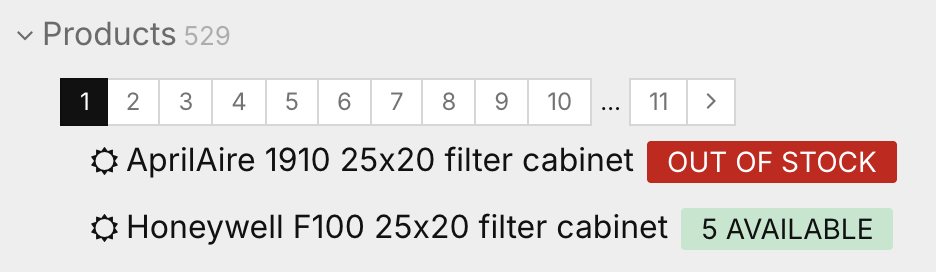
There is one function available in all Page classes that lets you specify how the Page should appear in the admin page list: getPageListLabel(). This the only method you'll find in the Page class that is intended for the admin (though you could always call it yourself from elsewhere). This method returns the HTML to represent the page in the admin page list. It should include only inline HTML, and since it is HTML, any text must be HTML entity encoded too. In the example below, we'll specify how we want our ProductPage pages to appear in the admin page list, which will make them look like the screenshot above.
class ProductPage extends Page {
  // ...
  public function getPageListLabel() {
    $title = $this->getFormatted('title');
    $qty = $this->num_available;
    if($qty > 0) {
      $label = "<span class='uk-label uk-label-success'>$qty available</span>";
    } else {
      $label = "<span class='uk-label uk-label-danger'>Out of Stock</span>";
    }
    return "$title $label";
  }
}
Help your IDE help you with fields
Once you get used to your IDE recognizing what $page->field_name is, you'll find you want to go further and have it recognize what $page->field_name->property is too (for fields that have properties). ProcessWire doesn't let you replace the actual classes that are used by fields, though some fields themselves may provide the ability. But either way, you can still derive a major benefit of using custom classes. Simply create a class that represents the field, use phpdoc to document its properties, and add it to the phpdoc of the custom page class.
In the example below, I'm creating a custom class for a Combo field named "seo" and I place my custom field classes in /site/classes/fields/.
/**
 * /site/classes/fields/SeoValue.php
 *
 * @property string $browser_title
 * @property string $meta_description
 * @property string $canonical_url
 * @property bool|int $noindex
 *
 */
class SeoValue extends ComboValue {}
Then, on any page templates where the field is used, I update the custom page class to refer to my custom field class rather than the ComboValue one used natively by the Combo field:
/**
 * /site/classes/DestinationPage.php
 *
 * @property SeoValue $seo
 *
 */
class DestinationPage extends Page {}
Now when I am coding, my IDE recognizes not just the fields/properties of the $page, but also of $page->seo->...
Let's say that the DestinationPage also has a Table field named quotes, and each row in the table has quote, cite and date properties. Here's how we might create a class to document that:
/**
 * /site/classes/fields/QuotesTableRow.php
 *
 * @property string $quote
 * @property string $cite
 * @property string $date
 *
 */
class QuotesTableRow extends TableRow {}
Now add it to the class(es) that have the quotes field:
/**
 * /site/classes/DestinationPage.php
 *
 * @property QuotesTableRow[] $quotes
 * @property SeoValue $seo
 *
 */
class DestinationPage extends Page {}
It takes very little effort to document multi-value fields in this way, but the convenience it adds and the time that it saves you in development is major.
If you made it this far, thanks for reading! Did I miss anything? Please let me know. And if you have any questions, please reply below, or in the support forums. It'd also be great to hear from you, about how you are using custom page classes in your projects.
Comments
Mikel
Great article, Ryan! This is by far the most comprehensive write-up on custom page classes I’ve seen.
One thing I’d love to see added if you ever update this post:
Historical context – It might help newcomers to briefly mention when custom page classes were introduced (3.0.152 if I remember correctly) and how the typical PW workflow evolved from pure template files to custom page classes. That journey gives a lot of context for why this feature exists.
Small syntax note – In the interface examples, implements comes after extends in PHP, so “class BoatTourPage extends Page implements TourPage” would be the correct order, I think?
But honestly, these are minor additions to what is already an excellent reference. I’ll definitely be sharing this with our developer colleagues. Thanks for putting it together! 👍
Cheers, Mike
Reply